Summarize this post with:
Deleting an old Facebook account you no longer have access to is a problem that can happen to anyone.
Besides, it is normal for anyone to open a Facebook account, then stop using it, lose access, and leave that account forgotten.
And when you do not have access to this account, the information, the posts or the content on that account can harm you in your present.
Is it possible to delete an old Facebook account you no longer have access to?
Yes, it is possible to delete that account that has been forgotten for a long time and that you cannot access.
However, this process will be more complicated than if you had access to your account.
So the first step will be to try to recover access to your account, either by recovering your password or by trying to recover access to the email or the phone number your Facebook account is linked to, the one you no longer have access to.
Steps to recover an old Facebook account if you cannot regain access
If you cannot recover your old account in any way (remembering the old password, accessing the associated email or phone number, etc.), the deletion process will depend on the information you still remember or keep.
So, to delete an old account, you must follow these steps:
1. Log in from a known device and location
Facebook keeps a record of the devices, the wifi networks and the browsers you have connected from before.
So, if you carry out this recovery process from a phone, a computer or an internet connection you used to log in from, you have a better chance that Facebook will identify the previous account as yours.
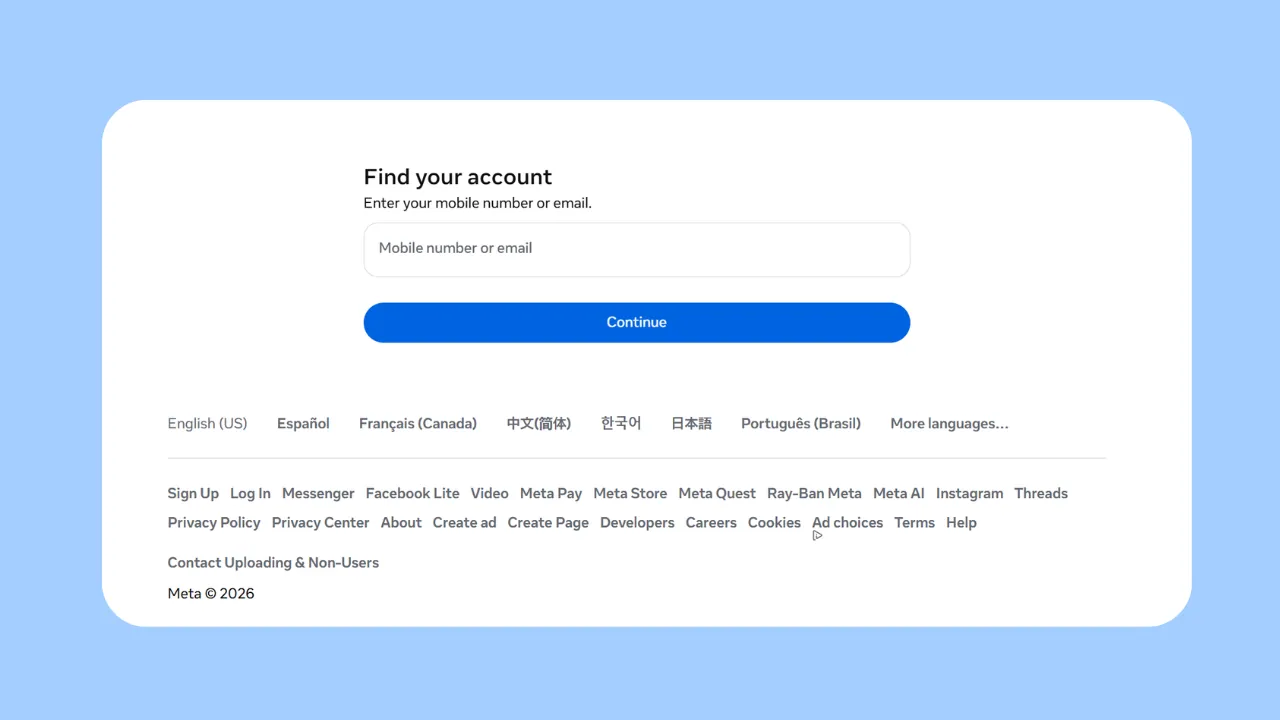
2. Use the Facebook account search tool to recover the profile you can no longer log into
Facebook offers an official tool to find any account within the platform.
With this Facebook tool you can start the recovery process for your account that you no longer have access to, and then delete it, with the following steps:
- Go to the official Facebook account search page.
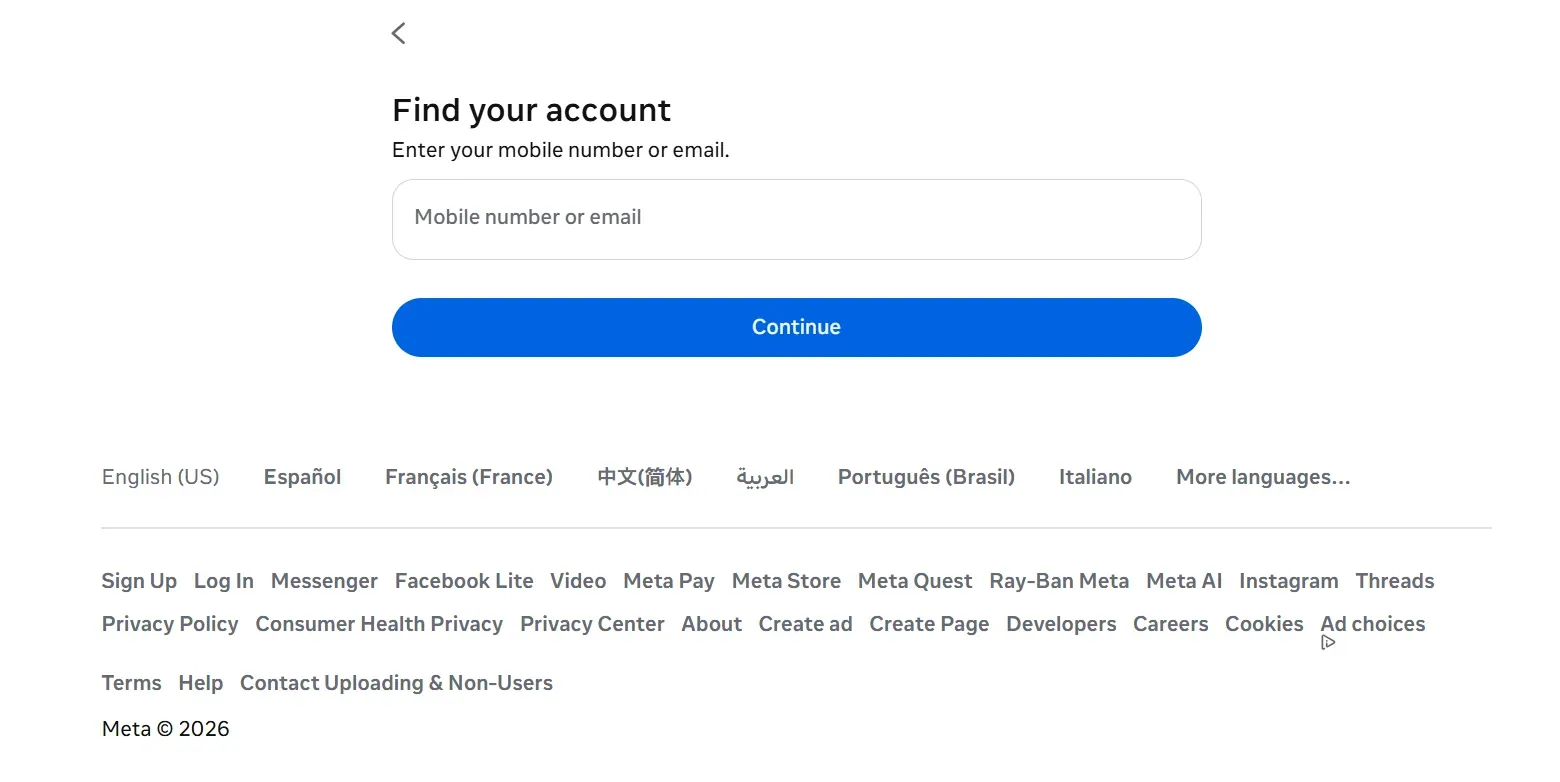
- Then, enter your full name, your username (the one that appears in your Facebook profile URL, for example:
[facebook.com/your.username]) or an old phone number or email that you remember. - Next, you must select your account from the list of results.
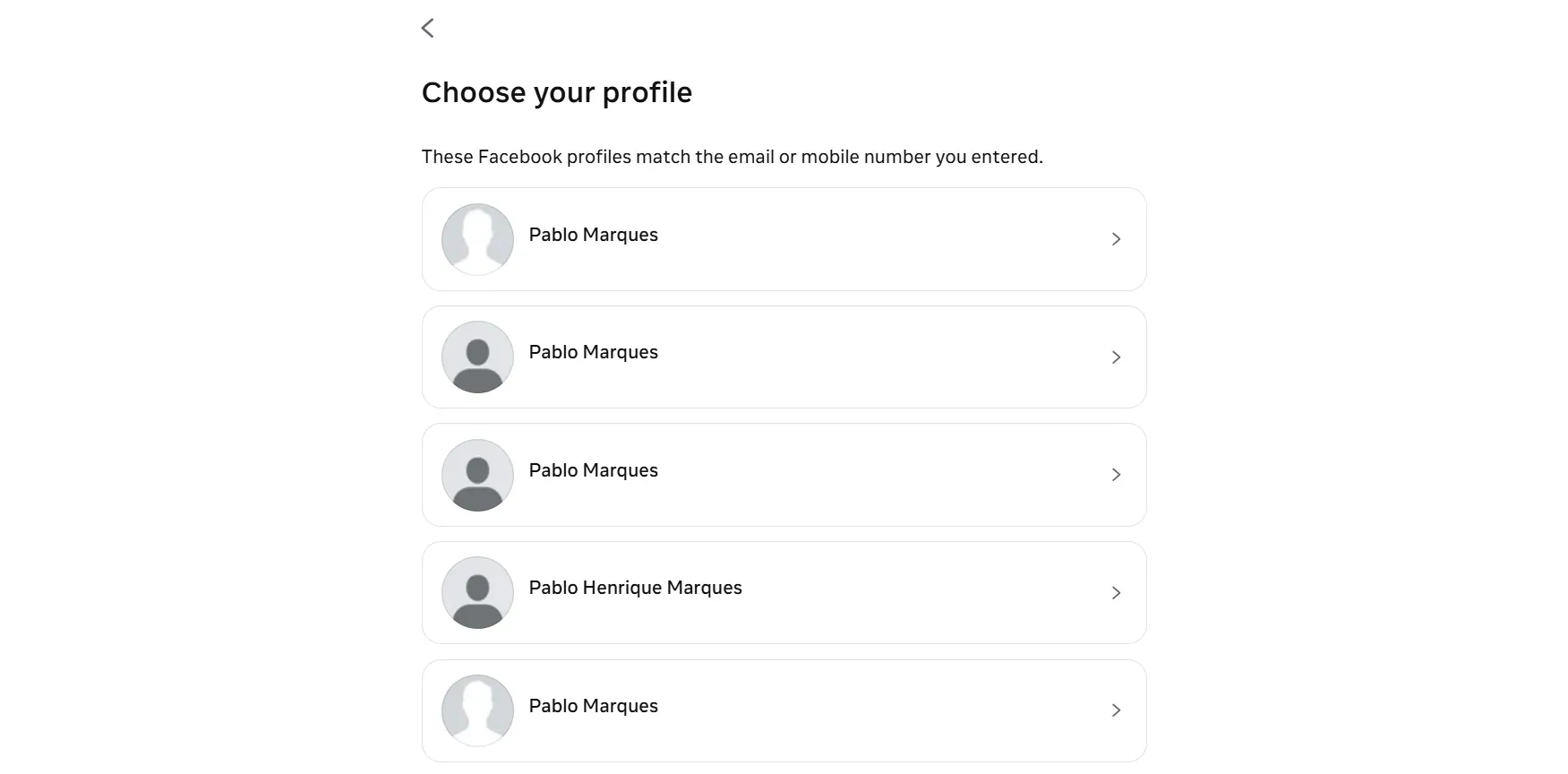
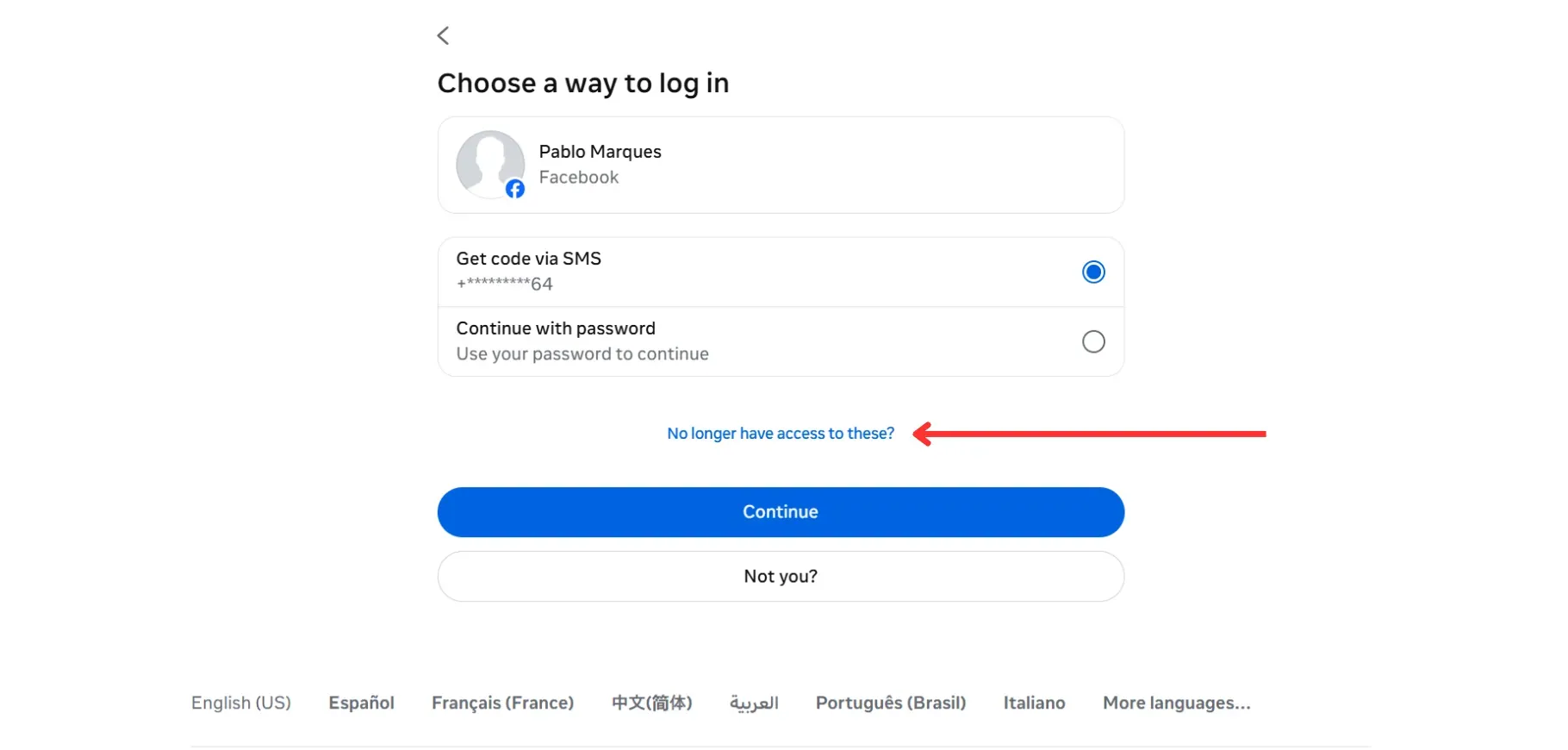
- If you do not have access to the registered email or phone number, when Facebook asks you to choose a method to send you a security code, you can click on the option “No longer have access to these?” or “Don’t have access to these?”, which is usually at the bottom of the window.
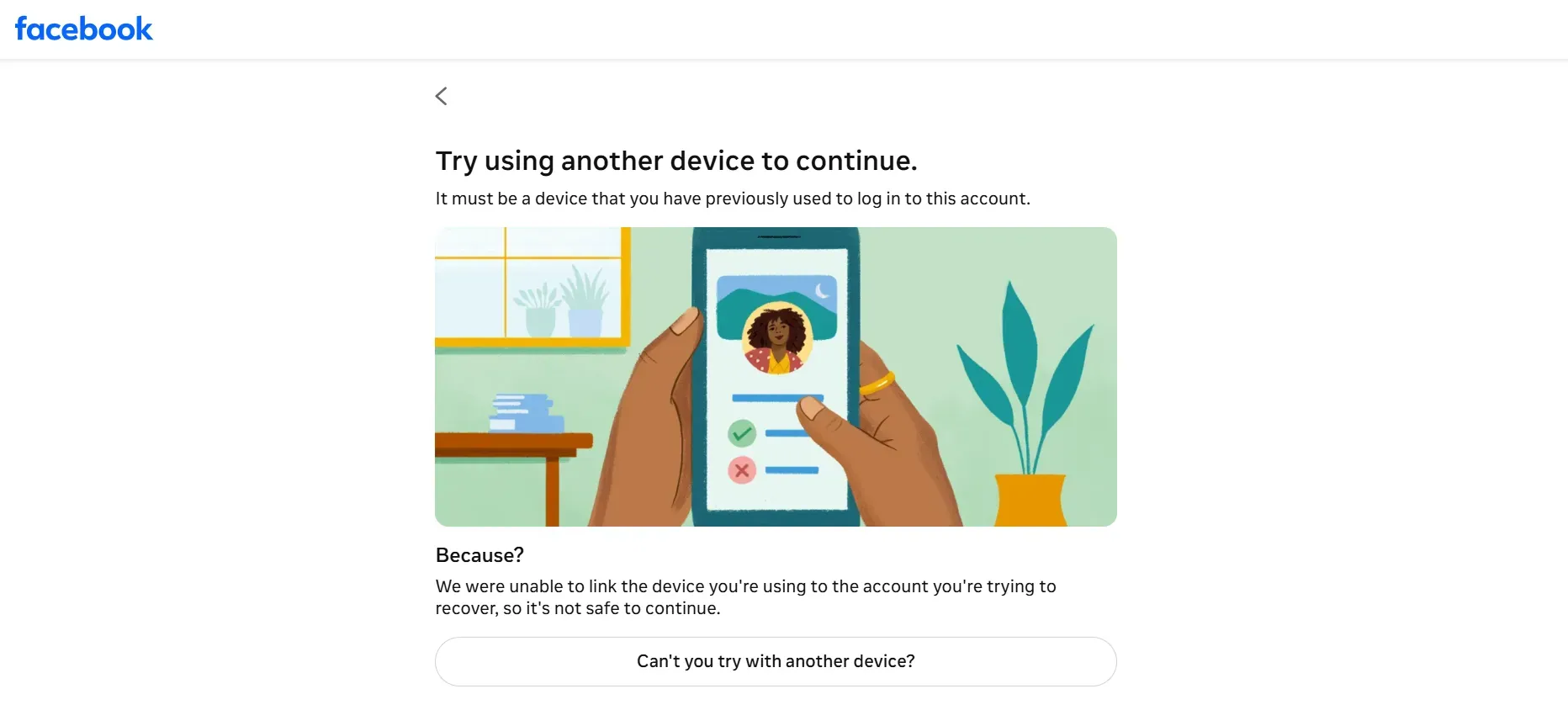
- At this point, if you are on a recognized device, Facebook will ask you to enter a new email address or phone number that you do have access to, so it can contact you during the recovery process for your old account.
- After this, Facebook will send a 6 digit verification code to that new email or phone number. You must check your inbox or your messages and enter this code on the screen.
- Then, the platform will ask you to verify your identity by uploading a photo of your official identity document (ID card, passport or driver’s license) to recover your account.
- Once the document is submitted, the security team will review whether the details on the document match the details on the Facebook account. If everything matches, you will receive a special link in your new email to reset the password and log back into the account.
If you cannot find your account with the search tool, you can ask a friend on Facebook to visit your old profile and check the “About” section, to see whether the associated email or phone number appears there.
What should you do to delete your account after recovering access?
Once you have recovered access with the procedure above, you can now move forward with deleting the account.
To do this you must complete the following steps:
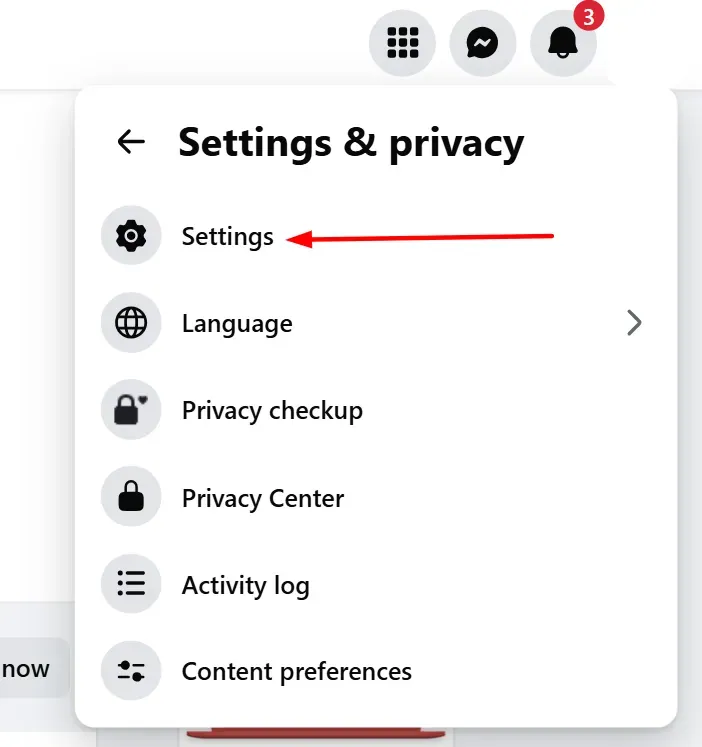
- First, you must click on your profile picture (in the upper right corner on a computer or in the three line menu in the mobile app).
- Then, you have to select “Settings & privacy” and click on “Settings“.
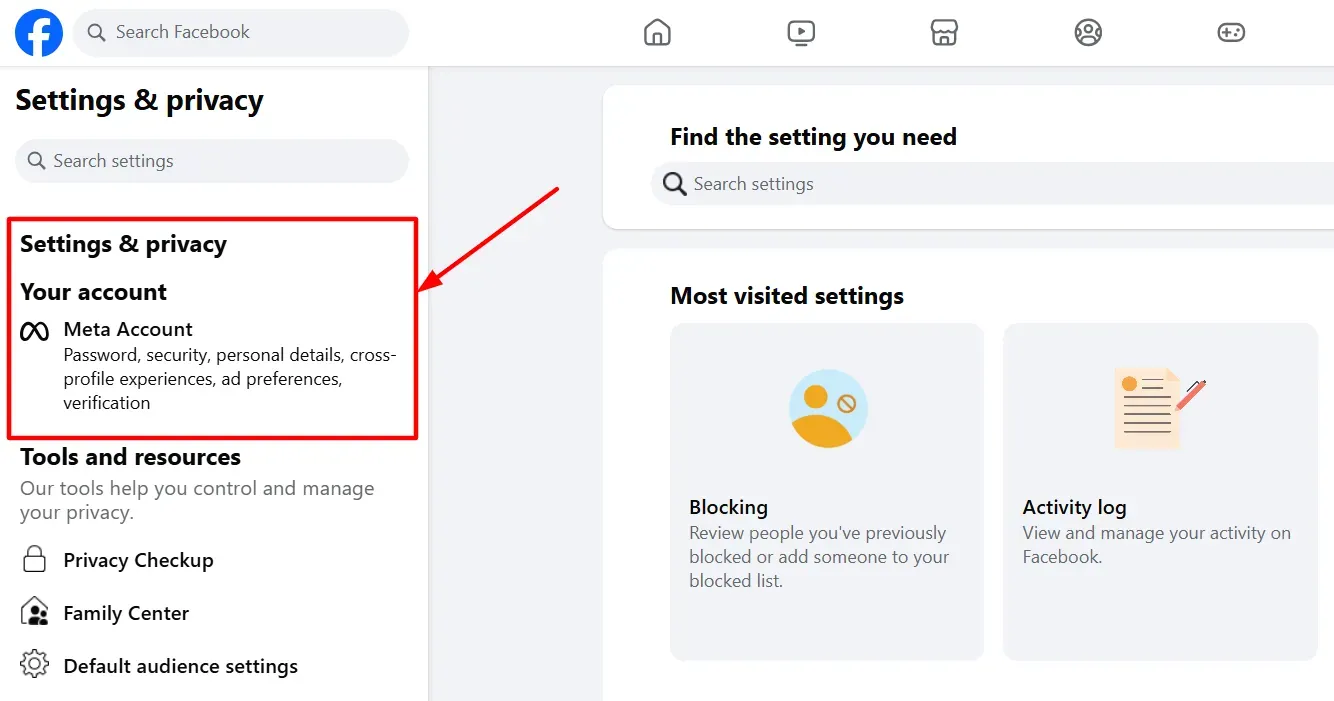
- On the left side of the screen, you must look for the “Meta Accounts Center” box.
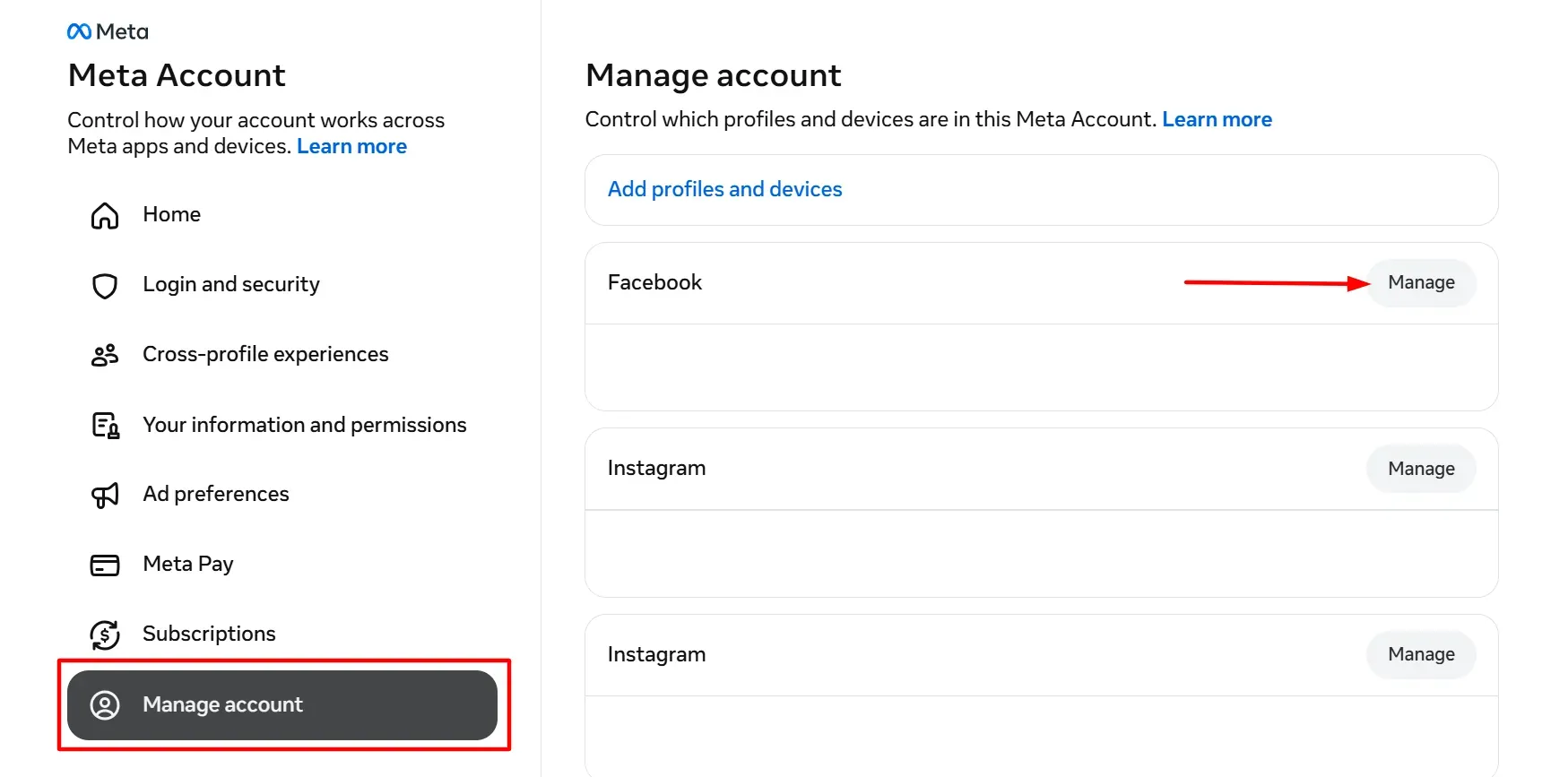
- Then, you must go to the “Manage account” section and then click on “Manage” on the profile you want to delete.
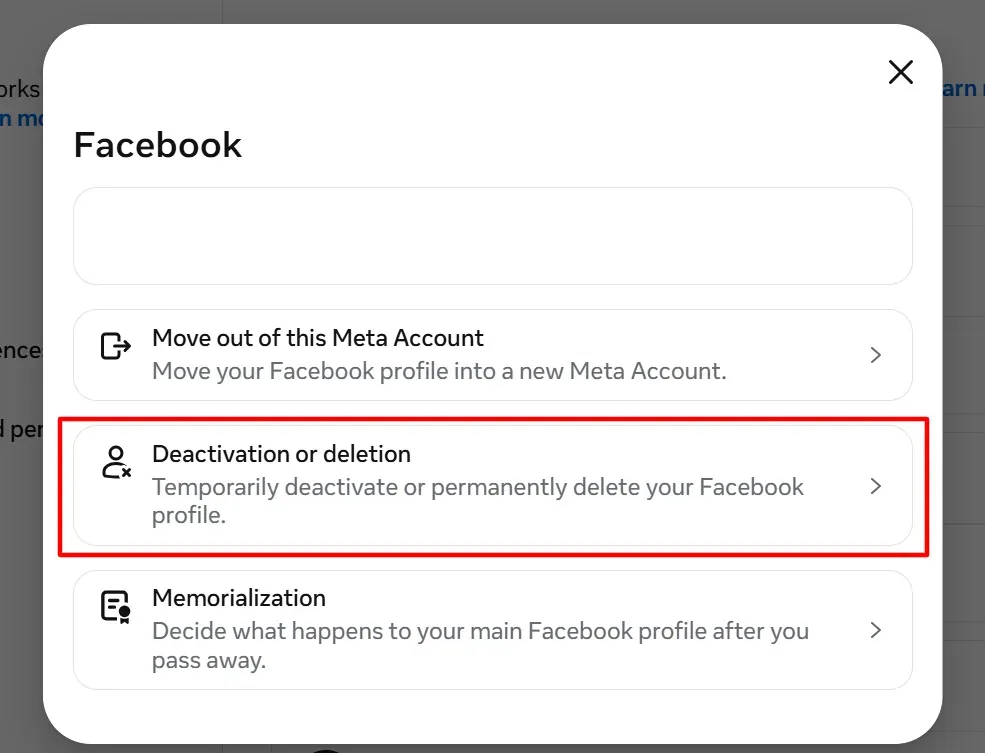
- After that, select the Facebook account you want to delete and choose the “Delete account” option.
- To confirm the deletion of your account, you must enter the password, to confirm that you are the owner, and click on “Delete account”.
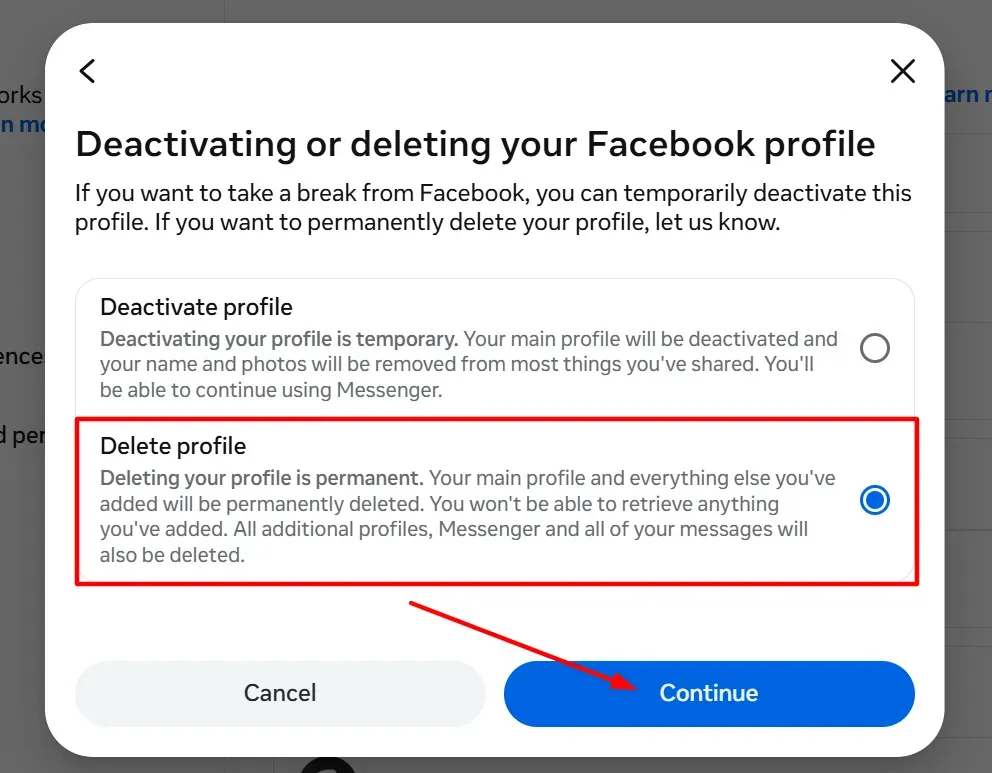
This way, you will be able to complete the deletion of a Facebook account you did not have access to.
An important aspect to consider is that, once deletion has been requested, the account is not deleted immediately.
This is because Facebook grants a 30 day window so that, if the person regrets that decision, they can log back in within those thirty days and the deletion request will be cancelled immediately.

Take back control of your online reputation
We can review your case and offer a personalized solution to take back control of what’s said about you or your business online.
Get a quote in less than 24 hours
If I delete a Facebook account I did not have access to, what happens to the associated pages and services?
If the Facebook profile you want to delete is the only admin of a Facebook page, or is linked to an Oculus/Meta Quest account or to a Facebook group, access to these services will be lost permanently.
So, the option to avoid losing access to any of these Facebook services is for another person to be made an admin before deleting the account.
How to delete a Facebook account if the account holder has passed away?
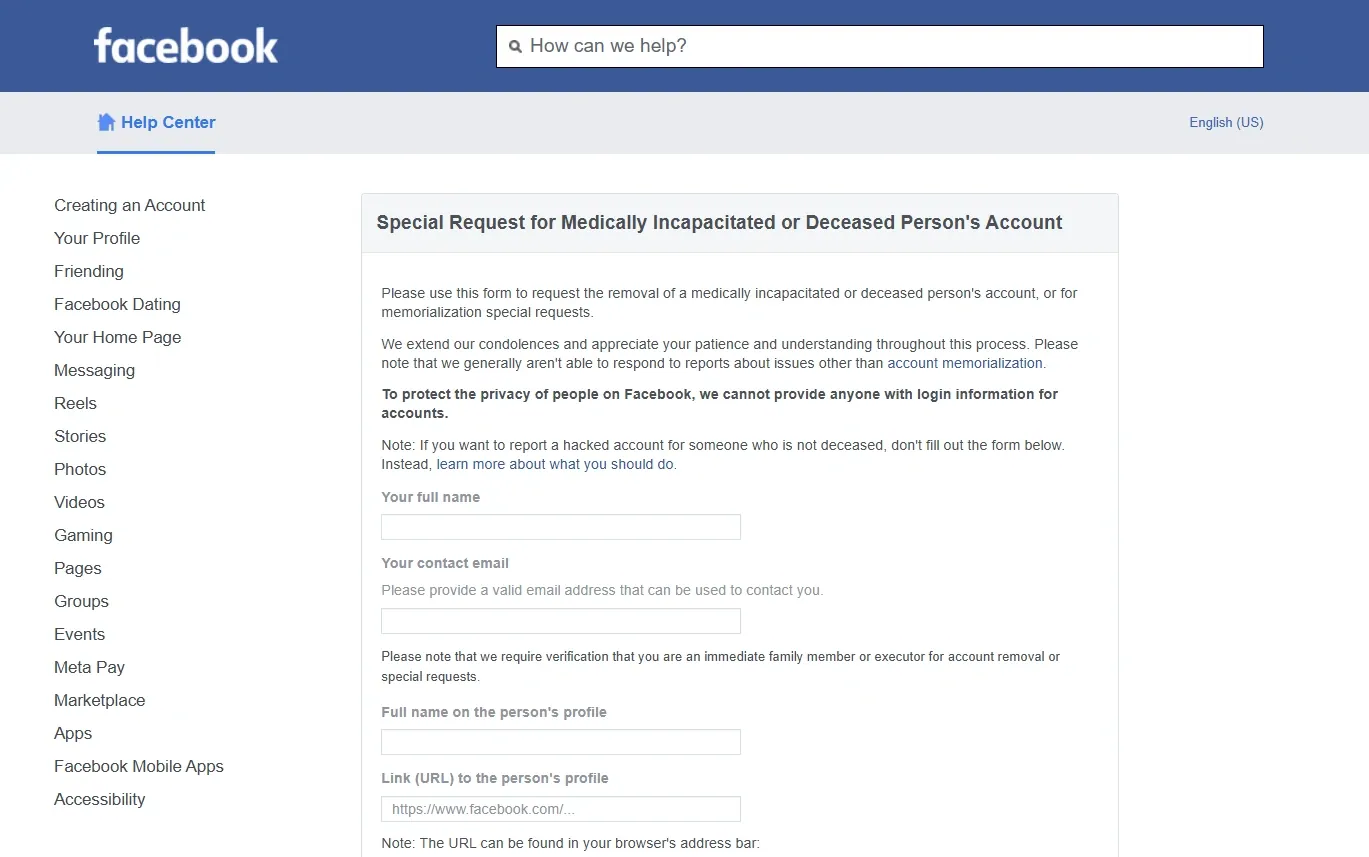
There can be cases in which a person wants to delete one or several old Facebook accounts because the account holder has passed away.
In this regard, Meta has a specific form, in which you must provide that person’s information, verify the requester’s identity and submit proof of death and of the legal relationship.
What happens if this Facebook account, which I did not have access to, contains negative information or content about me or my business?
If this is your case, by following the process we have described to request deletion you can also erase all the information and content associated with that old Facebook account or profile.
However, if there is negative or harmful information, it may still exist within Facebook.
In this situation, you must take measures to track, detect and completely remove any activity or information that makes you uncomfortable or that harms you or your business.
Conclusions on deleting a Facebook account you have lost access to
As you can see, deleting a Facebook account you can no longer access IS possible, but it requires following an exact procedure of guidelines and remembering the information that was associated with your account.
In any case, if it was not possible for you to delete the content or the old profile of your Facebook account, you can still opt for removal processes, for content suppression (if it appears on Google or in AI models, for example) and for specific reputation actions to protect your image and what appears about you on the internet.
If this is your case, starting to act on that old content or those old profiles you can no longer access is the first step to stop your information, your content or your old accounts from continuing to appear on the internet.
At Media Removal we specialize in Facebook content removal and on other platforms such as Trustpilot and Reddit, in content suppression on Google and in improving the online reputation of companies and public figures.
If you want to delete an old Facebook account and stop it from appearing on the internet, you can request an evaluation of your case with us and we will gladly help you to solve your online reputation or content removal problems.
 Subscribe to our newsletter
Reputation insights and industry news from the Media Removal team, straight to your inbox.
No spam. Unsubscribe anytime.