Summarize this post with:
When a person decides to look into how to delete Reddit history, they may be surprised to discover that there is no single button that clears everything at once.
Reddit stores every type of content users generate separately, and each type of information is tied to its own specific deletion process.
So while some content can be deleted in 2 minutes or less, other types of information may require more time and effort.
Let’s go over the different methods for deleting content on Reddit, which method deletes which information and which doesn’t, and how you can carry out these processes on your mobile app or from your desktop.
What type of information does Reddit store in your history?
First of all, it’s important to understand exactly what type of information is included in your Reddit history, since this makes it easier to identify the most appropriate deletion method.
With that in mind, let’s go through the account data that is typically part of what is considered history:
- Posts and comments you wrote, visible to anyone on your profile.
- Local browsing history, meaning the threads and communities you opened from that device.
- Search history, which feeds the suggestions that appear when you type in the top bar.
- Votes, saved items, and hidden posts, which appear in separate tabs on your profile.
- Direct messages and chats, which remain in conversations even after you close the account.
Local browsing history and past searches tend to be the fastest data you can regularly clear on Reddit, since the platform includes specific methods for these two types of information.
Posts and comments can also be removed relatively quickly, but this will depend on how much volume you’ve accumulated on the profile, since Reddit doesn’t offer a button to remove this information in bulk.

How to clear reddit recent history: search and local browsing data
Two of the easiest and quickest types of data to clear on Reddit are your local browsing history, meaning the posts you visit from your account on a particular device, and the searches you’ve made on the platform.
As we’ll see below, the process for deleting this content tends to be quick and simple no matter where you do it, whether on the Reddit mobile app or in a desktop browser.
How to delete history on Reddit from your desktop
To start, you can delete your recent searches on Reddit by heading to the site’s search bar, located at the top of your screen.
If you click it, a short menu will drop down showing the subreddits you recently visited and the search terms you’ve used. You can remove both by simply selecting the X to the right of each one.
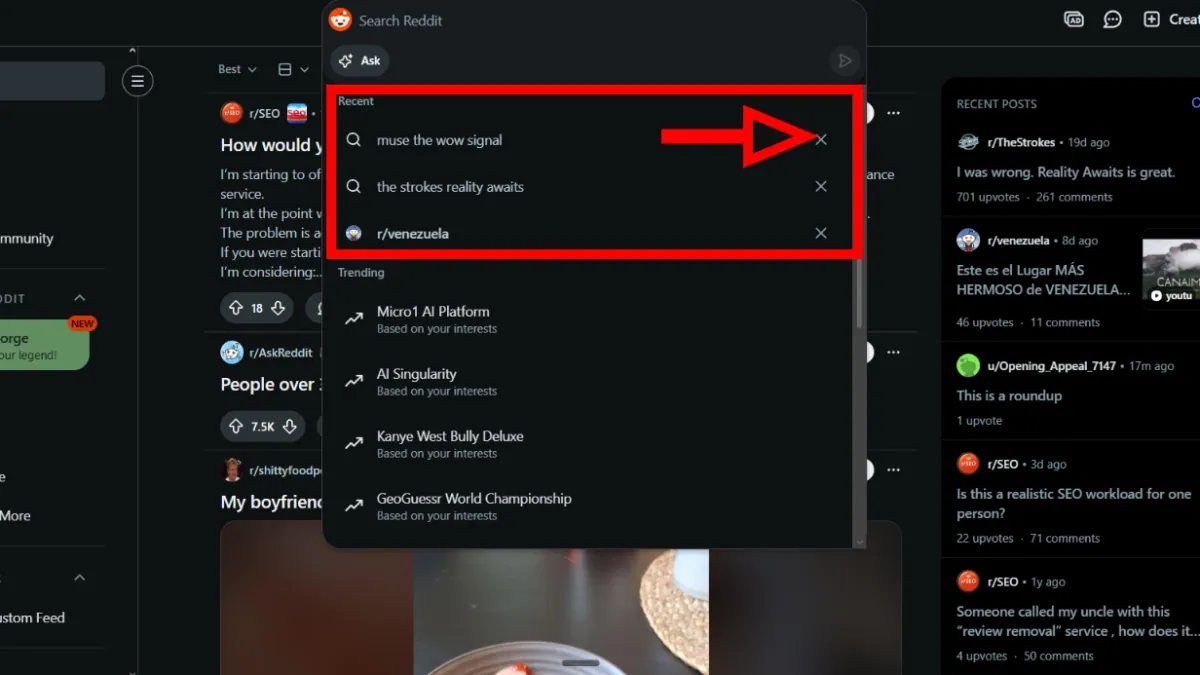
On the other hand, the process for deleting your recently visited posts history usually involves a few extra steps:
- First, you can go into your Reddit profile settings by selecting your avatar in the top right corner and clicking “Settings.”
- You’ll land on a new page with several tabs. Here, you should choose the “Privacy” tab.
- To finish clearing your history, you can head to the button located at the bottom of the page. Clicking it will let you delete the posts you’ve visited on the platform.
It’s worth mentioning that this action doesn’t delete other account elements that could affect your reputation, such as your own posts and comments on other threads.
How to delete Reddit history on mobile
The process for deleting your recent searches on Reddit from the mobile app tends to be very intuitive and easy, since here you simply need to locate the search bar and remove the content you’ve visited one item at a time.
If you want to delete your entire search history in bulk, you can click on the “History” option, which will take you to a new screen showing all your searches. From there, you can select “Clear All.”
As for local browsing history, the process for clearing it from the Reddit mobile app usually looks like this:
- After logging into your Reddit profile, you should locate your avatar, select it, and enter your account menu.
- Once in the menu, you’ll need to find the three horizontal lines in the top right corner of the screen. These lines open up several options, and the one you should select is “History.”
- You’ll land on a new screen with three vertically stacked dots. Tapping them will bring up the “Clear recent history” button, which you can use to delete your viewed posts history in your mobile app.
Again, it’s important to note that this action doesn’t delete your comments or the posts you created on the platform with that account.

Take back control of your online reputation
We can review your case and offer a personalized solution to take back control of what’s said about you or your business online.
Get a quote in less than 24 hours
How can I delete my Reddit posts and comments?
For someone focused on managing their digital footprint, posts and comments may be the type of content they’re most interested in removing from the site.
Fortunately, the process for deleting individual opinions and posts tends to be fairly simple on both mobile and desktop:
- First, you should click on your profile picture and enter your account menu.
- Then, depending on what you want to delete, you can open either the posts tab or the comments tab.
- Next, you should tap the three-dot menu that appears next to the item.
- Finally, you can select the delete option and confirm the action.
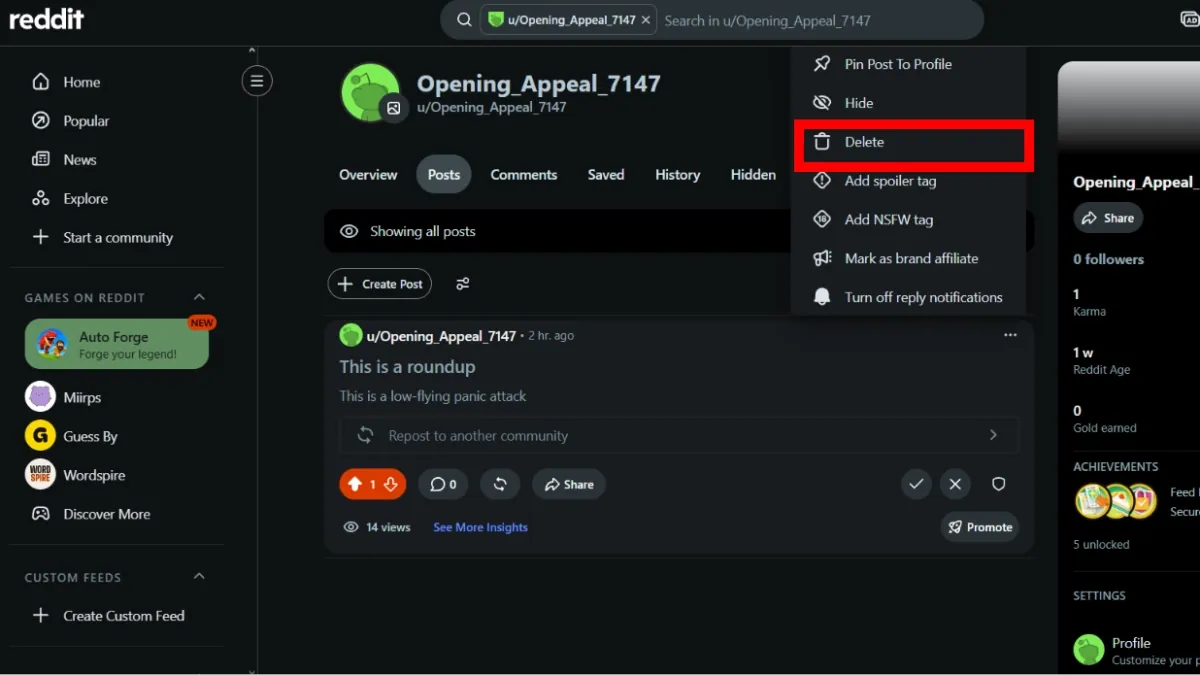
At this point it’s worth clarifying that the context of the deleted post remains in place after deletion. In other words, other people’s replies will still be visible, and anyone with the exact link to the post can still access it.
That said, when the deleted post is part of a potentially harmful or defamatory thread, a more suitable solution may be to turn to Reddit post removal services offered by companies that specialize in content removal.
How to delete a Reddit account
Someone who no longer wants to keep accumulating information on Reddit can choose to delete their account from the platform.
You can go to the “Settings” section and, under the “Account” tab, locate the option “Delete account.”
After clicking it, Reddit will open a pop-up window you can use to explain your reasons for leaving the platform and to re-enter your credentials before confirming your decision with the “Delete” button.
What happens to my history if I delete my Reddit account?
Many people have closed their Reddit account believing this completely erases their trace on the site, but the truth is that deleting the account doesn’t remove the posts or comments from the profile.
According to Reddit’s official help center, the profile disappears and the username is no longer associated with that content, but the comments and posts remain visible on the platform, just without authorship information.
That said, managing the digital footprint left behind on Reddit is a process where, in many cases, order does affect the outcome.
How to delete hidden history on Reddit and manage what’s left
The most important thing to know about deleting your Reddit history is that you can rely on multiple options depending on what you need.
If you simply want to clear your search history or your recently visited posts, including hidden posts and saved items tucked away in separate tabs, the process tends to be quite simple on both desktop and mobile.
Deleting your posts and comments is, in many cases, also a relatively straightforward procedure, but this will depend on how much content you’ve accumulated on your account since it was created.
Either way, for more complex scenarios where a few clicks may not be enough, the most appropriate course of action may be to turn to a team of content removal specialists.
At Media Removal, we can be the partner you need to manage Reddit content deletion processes that the platform’s official procedures may not fully resolve.
If you need a team of experts who will listen to your needs and genuinely understand your concerns, you can schedule a meeting with us so we can start building a solution tailored to your circumstances.
 Subscribe to our newsletter
Reputation insights and industry news from the Media Removal team, straight to your inbox.
No spam. Unsubscribe anytime.