Summarize this post with:
Getting a bad review on Yelp tends to be uncomfortable for many businesses, and in this situation, they may look for ways to delete these comments from their page.
It can also happen that you wrote a review you’d rather take down because, after some time, your perception of the business or the experience changed, and what you wrote in the past no longer represents you as a customer.
The truth is that Yelp has a strict moderation system, with clear rules about which reviews can be reported, who can remove content, and what methods exist for managing opinions that don’t comply with its policies.
Whether you’re a business owner or a customer, knowing how to delete reviews on Yelp is likely to be useful. We’ll help you understand the different procedures available and what yelp review removal actually involves.
Is it possible to delete a Yelp review?
First of all, yes, it is possible to delete a review on Yelp, but under conditions that apply to specific circumstances.
For example, the author of a review can delete their comment or edit it from their account, without needing Yelp to step in to carry out this action.
On the other hand, can a business remove a Yelp review from a third party directly? Not on its own, but it can report the comment so that Yelp’s moderators review the case and decide whether the content breaks a rule that warrants removal from the platform.
That said, it’s worth noting that Yelp only takes down reviews that violate its content guidelines, and a low rating, unless it breaches the site’s policies, is not on its own grounds for removal.

Take back control of your online reputation
We can review your case and offer a personalized solution to take back control of what’s said about you or your business online.
Get a quote in less than 24 hours
Which reviews can Yelp remove for violating its guidelines?
Yelp’s content guidelines are the rules that determine what content is admissible within the directory and, along with that, which elements are subject to removal.
Yelp’s content guidelines establish that reviews must reflect customers’ direct experience with the business and, preferably, should include details that could help other people.
The directory’s guidelines also include the reasons that can justify a moderator removing a review:
- Hate speech, threats, or personal attacks directed at the business or its employees.
- Private information about employees or customers, such as addresses or contact details.
- Promotional content unrelated to an actual consumer experience.
- Reviews based on secondhand information, written by someone who didn’t live the experience.
- Conflict of interest, such as reviews posted by direct competitors.
- Content generated with artificial intelligence tools instead of a genuine opinion.
Before trying to report a comment made about your business, our main recommendation is to confirm whether the review fits into one of these categories under Yelp’s content guidelines.
Yelp tends to reject reports based solely on disagreement with the opinion expressed, even if that opinion is uncomfortable for the business.
How to delete a review you wrote yourself
If you wrote a review about a business in the past and want to remove it from the directory, the process Yelp offers for this tends to be very direct and easy to follow.
These are the steps to follow to delete a review you posted on this platform:
First step: go to the “About Me” section
To start the process of deleting the comment, you need to log into your Yelp account from the mobile app or the website. For this example, we’ll use the desktop browser version.
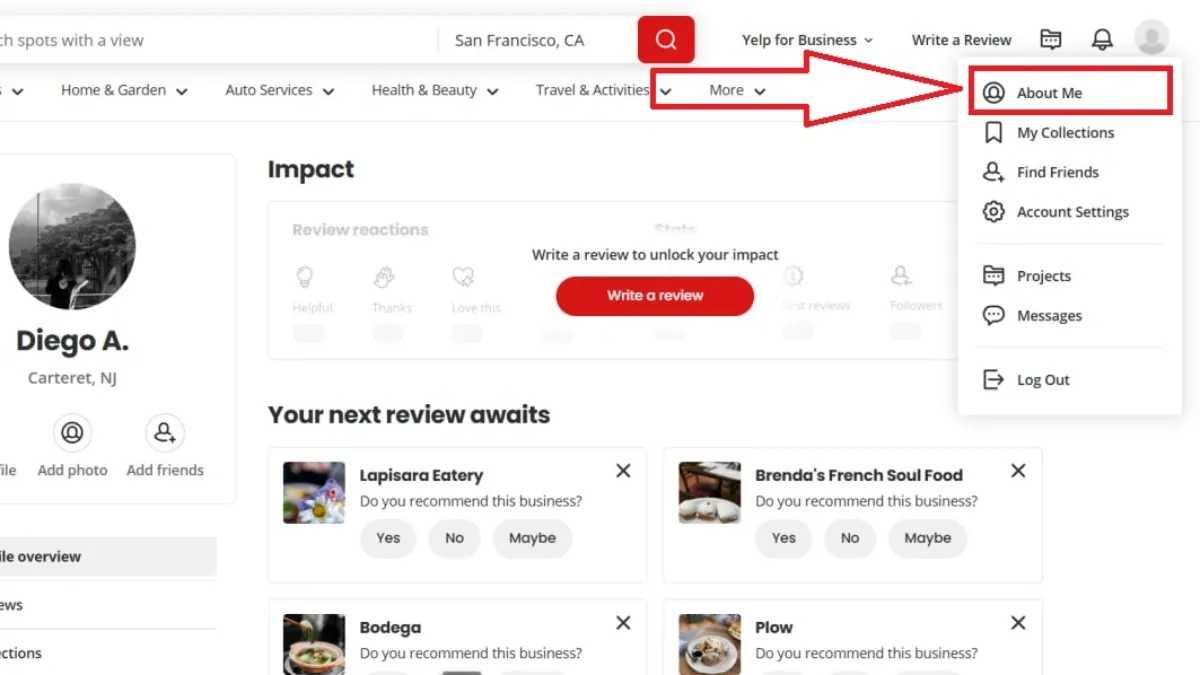
Once you’ve logged into your Yelp account, you’ll find your profile photo in the top right corner. Clicking on it opens a menu with several options. Among them, you can choose the “About Me” button.
Second step: go to the “Reviews” section
After entering your Yelp profile, it’s time to locate the section that holds the reviews you’ve published on the platform.
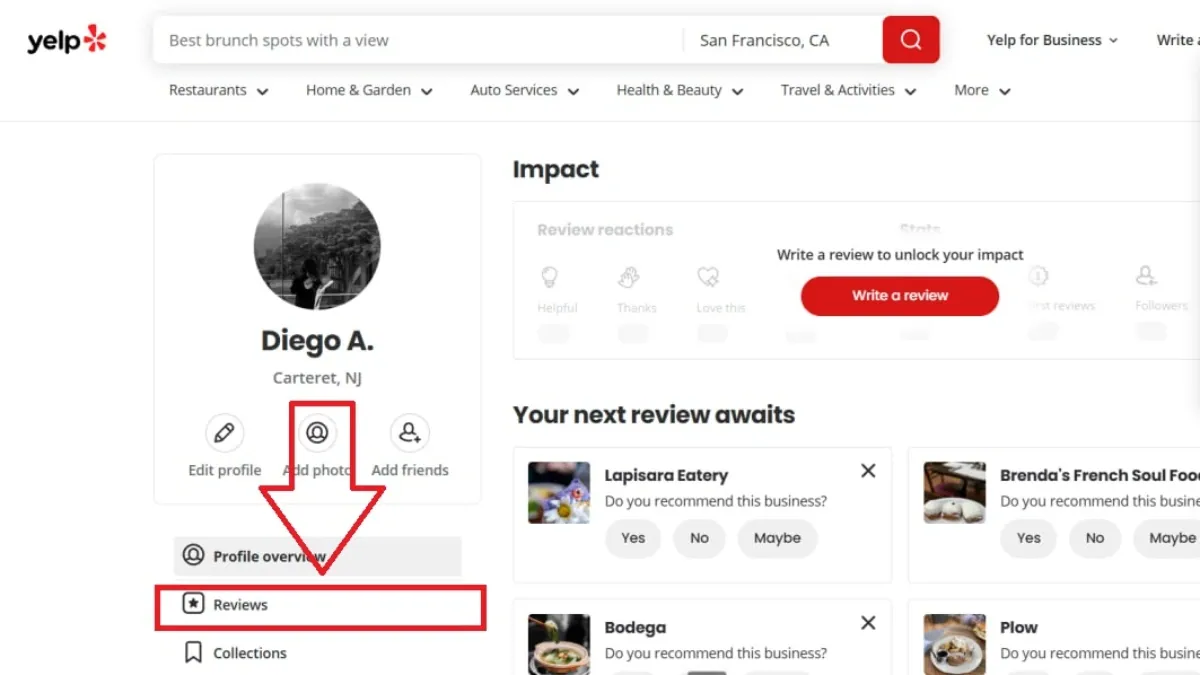
You can find this section on the left side of the screen, under “Reviews.”
Third step: choose the review you want to remove
As a third step, you need to select the comment you want to remove from the website.
We recommend clicking on the three horizontal dots included on each comment. This action will open a short list with the following options:
- Share review.
- Embed review.
- Edit review.
- Remove review.
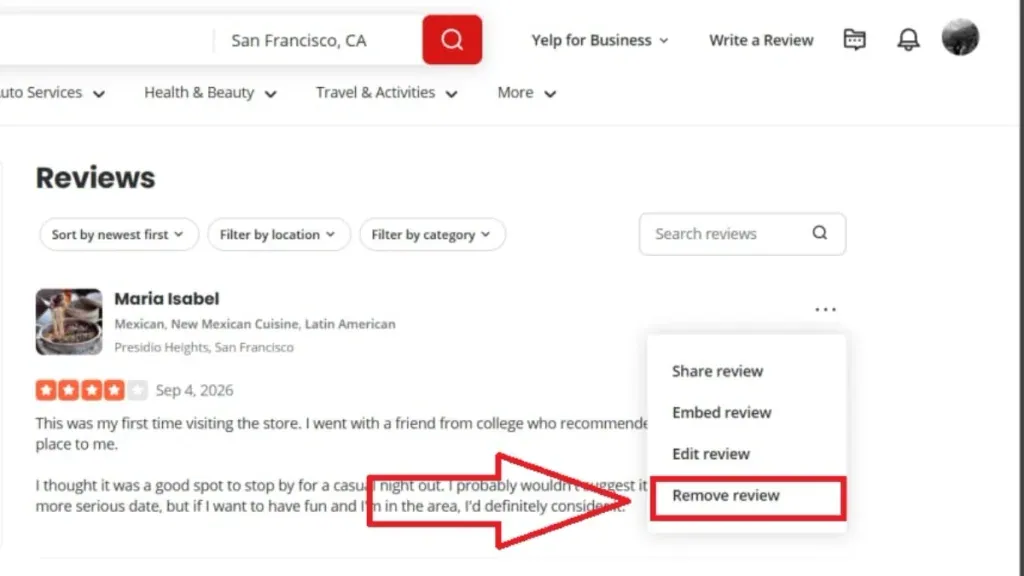
In this case, you need to select the third item on the list.
Fourth step: delete the selected review
Before the comment is permanently deleted, Yelp may present you with a short form listing some of your possible reasons, such as:
- I was threatened with legal action or a lawsuit.
- I was offered a refund or other compensation to remove this review.
- I signed a contract with this business that requires me to take down this review.
- I changed my opinion about this business after a new interaction.
If none of the above items match your situation, Yelp also offers a text box where you can enter reasons more specific to your case.
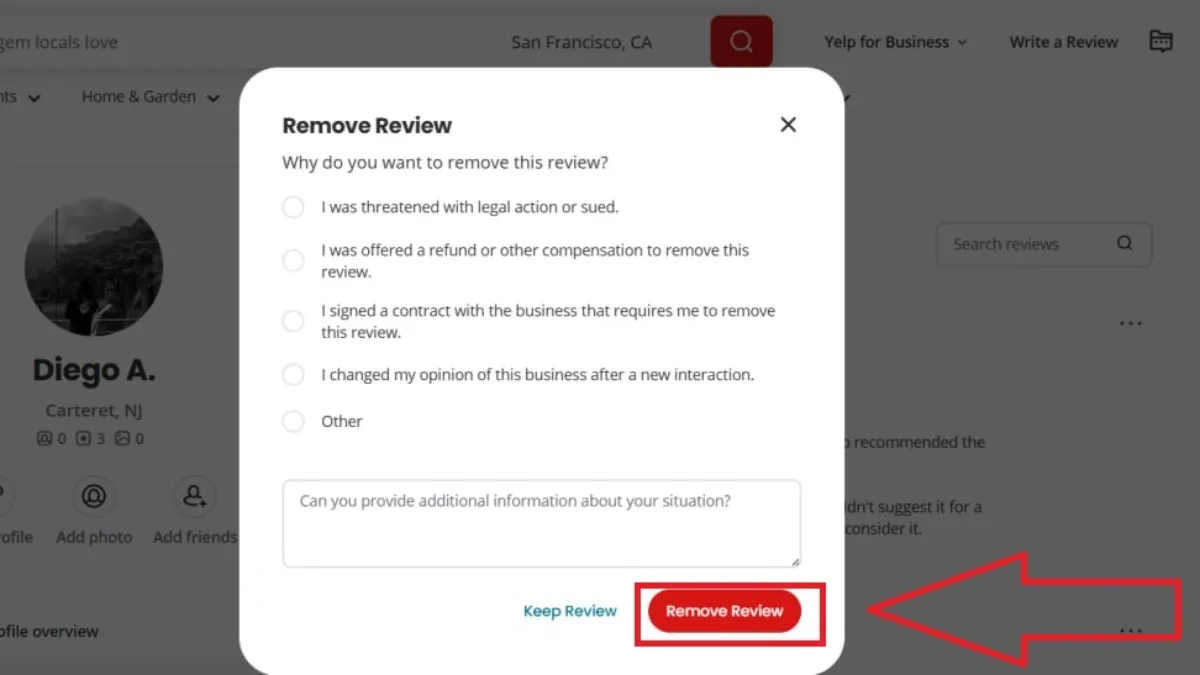
Once you’ve chosen the option that best represents you, you can click the “Remove Review” button to delete your review from the Yelp directory.
How to edit your own Yelp review without deleting it
A Yelp user may be unhappy with a comment they wrote and not want to remove it entirely from the website. In these cases, editing the opinion can be a better alternative.
The option to edit a review you wrote tends to be convenient when your experience with the business changed over time and you want to keep a record of that with an updated comment.
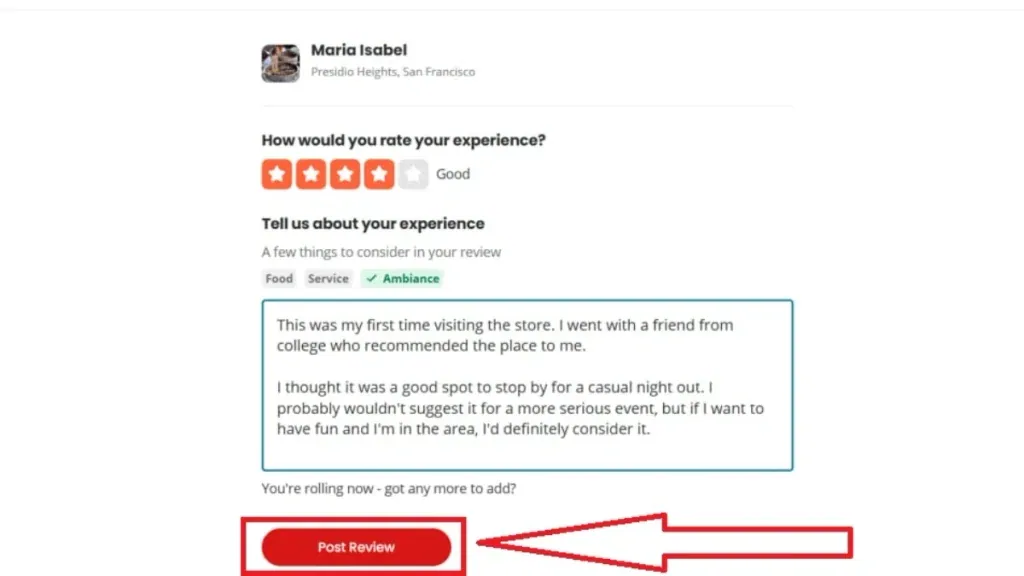
This process is similar to deleting your review. What changes is the option the user selects after choosing the opinion to modify. In this case, if you want to edit your comment, you can click “Edit Review.”
Yelp will take you back to the page for writing reviews and rating businesses or services. After making your edit, you can click “Post Review” so the directory updates the comment.
How can I report a review from my business account?
While the authors of reviews on Yelp can delete or edit them directly, business owners cannot remove comments on their own.
Instead, they need to request the possible removal of the content through a report on the website so that, that way, moderators can evaluate whether the comment is eligible for removal or not.
These are the steps you can follow to report a review that may violate Yelp’s content guidelines.
First step: log into your Yelp for Business account
The first thing you can do to report a comment made on your business page is to access your Yelp for Business account.
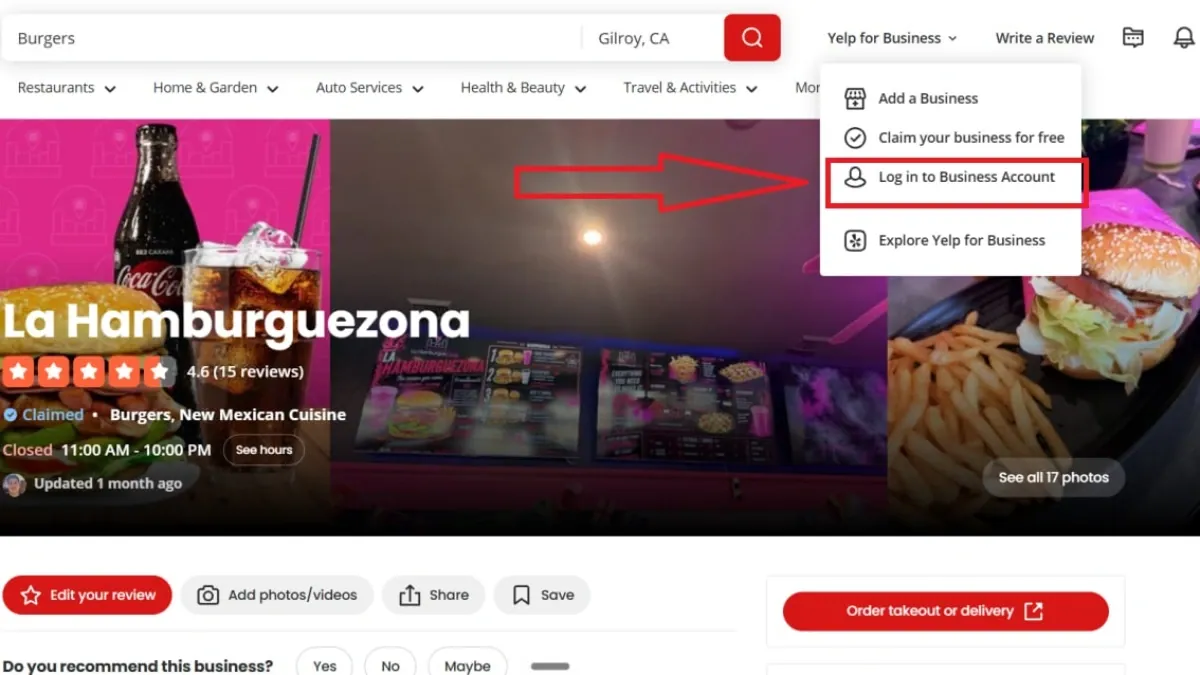
At the top of the website is the “Yelp for Business” button. Clicking on it opens a small menu with different options. You can choose “Log in to Business Account.”
Second step: locate the review you want to report
Once you’ve entered your Yelp business profile, it’s time to locate the review you want to report.
To do this, you can go to your business page within the directory and scroll down.
On the left side of the screen you’ll find a column with the different opinions people have left about your business, including the one you want to report.
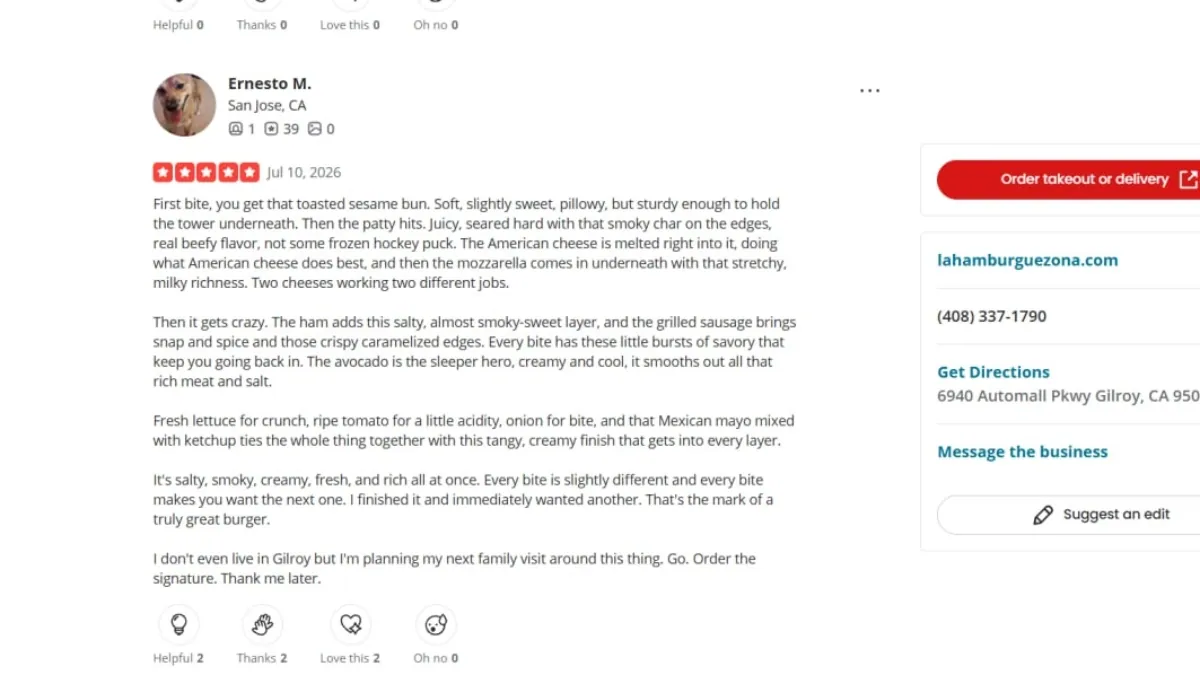
Third step: select the reason for the report and add a short explanation
Once you’ve located the comment you’re interested in reporting to Yelp’s moderators, you need to click on the three horizontal dots attached to each review to open a short menu of options. Here, you can choose “Report Review.”
Then, a pop-up window will appear with a list of possible reasons to report the review, including:
- The review contains false information.
- The comment was made by a competitor or former employee.
- The opinion doesn’t describe a genuine customer experience.
- The comment contains promotional material.
- The review violates Yelp’s privacy policies.
After choosing an option, Yelp will open a text box that lets you add more specific details that can help its moderators evaluate the case.
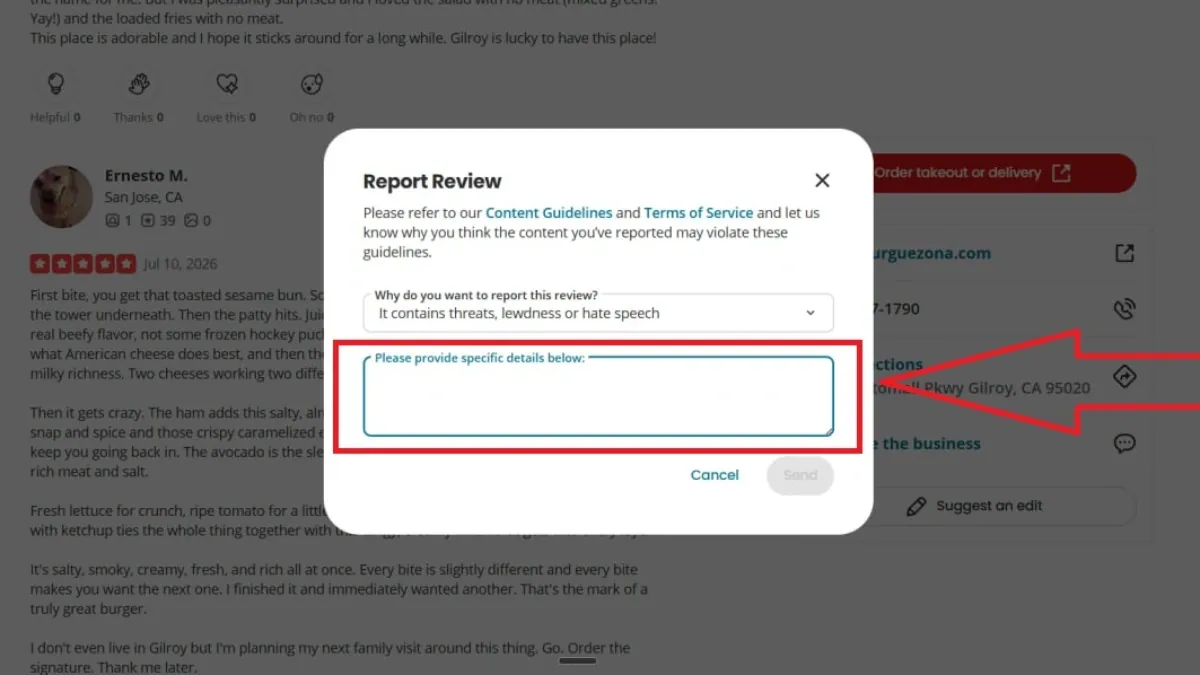
Fourth step: submit the report to Yelp
Finally, after choosing an item from Yelp’s list and adding relevant details for your case, you can submit the report by clicking the “Send” button.
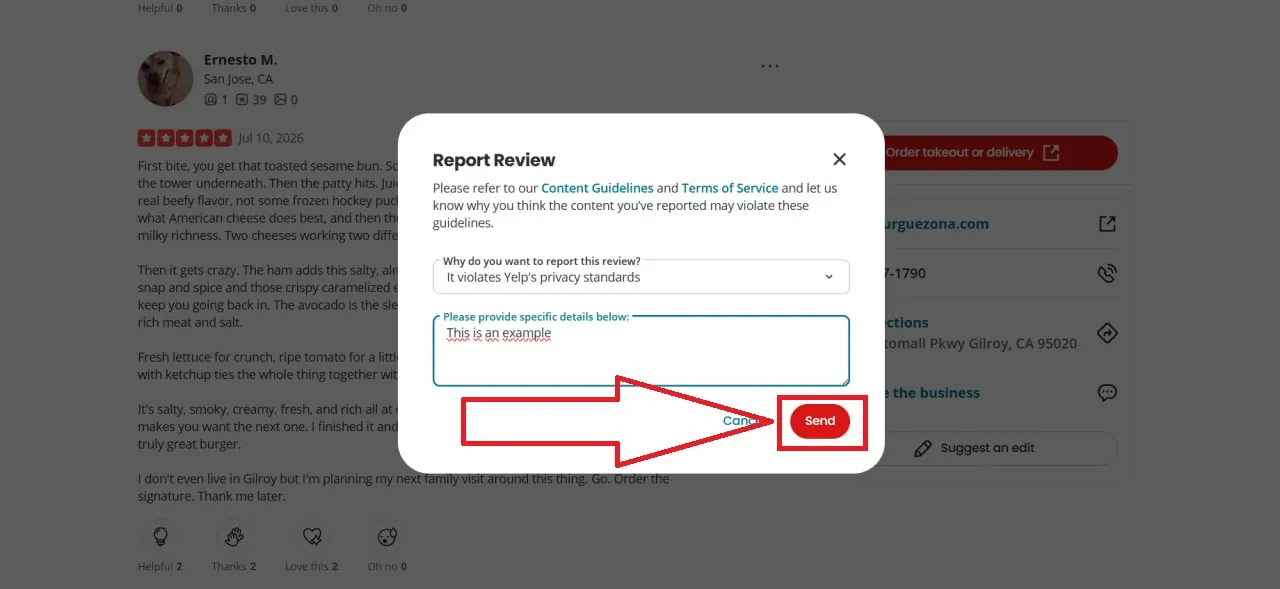
Yelp’s moderation team will deliberate on your report and send its verdict directly to the email address associated with the business.
What can business owners do if Yelp doesn’t remove the review?
In situations where Yelp’s moderators reject a business owner’s report about a review, it’s advisable to stay calm in order to properly assess the situation.
Managing the negative effect a bad review can have tends to be complex, but as a business owner, there are alternatives you can consider to help mitigate the comment’s possible impact on your reputation.
A good first step to address negative reviews that Yelp’s moderators decided not to remove is responding to the comment publicly and professionally.
Acknowledging the person’s dissatisfaction, taking responsibility for what happened, and, if possible, offering a concrete solution, is a response that can change the perception of both the person who wrote the opinion and future customers of the brand.
What options do you have for managing your Yelp reviews?
A single negative review doesn’t have to fully define how people perceive your business, but several unfavorable comments can affect future customers’ decisions.
That said, knowing in advance the circumstances that may allow you to delete a review on Yelp, along with the available paths for doing so, can likely spare you unnecessary frustration during the process.
However, if no course of action is enough and a user’s comment on Yelp keeps affecting your business, it may be time to turn to a specialized partner who can help you manage the case successfully.
At Media Removal we have a team of reputation experts who support businesses in situations like this one. We carry out a tailored assessment of each case to lay the groundwork for a fully personalized action plan.
If you’re dealing with an issue on Yelp or on any other platform, you can schedule a meeting and talk with our team about the options available for your specific case.
 Subscribe to our newsletter
Reputation insights and industry news from the Media Removal team, straight to your inbox.
No spam. Unsubscribe anytime.