Summarize this post with:
A person’s reputation is often at serious risk when defamatory photos of them are shared on WhatsApp.
When a private or group chat includes images with false accusations or that raise doubts about someone’s image, taking action quickly tends to mitigate the impact of the situation.
Is it possible to remove defamatory photos on WhatsApp?
Although it is possible for a WhatsApp user to remove defamatory photos of themselves from the service, the WhatsApp Help Center points out certain limitations, which we cover below:
- A regular user can only directly delete a defamatory photo in a group chat and prevent other people from seeing it if they have admin privileges.
- A person can delete a photo received from another user in an individual chat, but the image will only disappear from the recipient’s chat. The sender will keep a copy on their device.
- A user has up to 48 hours to delete an image sent by mistake to an individual or group chat so that no one can see it. After this period, if the user deletes the image, the recipients will still keep their copy of the file.
- If a person sets up their WhatsApp to automatically download received files, the photo may remain saved on their device even if it was deleted from the chat.
On top of all this, it is important to mention that WhatsApp notifies users when a message has been deleted in an individual or group chat, so people will know that a file was removed.

Take back control of your online reputation
We can review your case and offer a personalized solution to take back control of what’s said about you or your business online.
Get a quote in less than 24 hours
How to delete defamatory photos in an individual WhatsApp chat
If someone sent you an image of yourself directly on WhatsApp that could harm your online reputation, the app allows you to delete the copy you received so you no longer see it in the conversation.
With that said, we walk you through the step-by-step process:
- The first thing you need to do is open your chat with the person who sent you the image and select the photo.
- Next, you need to tap the trash can icon at the top of the chat.
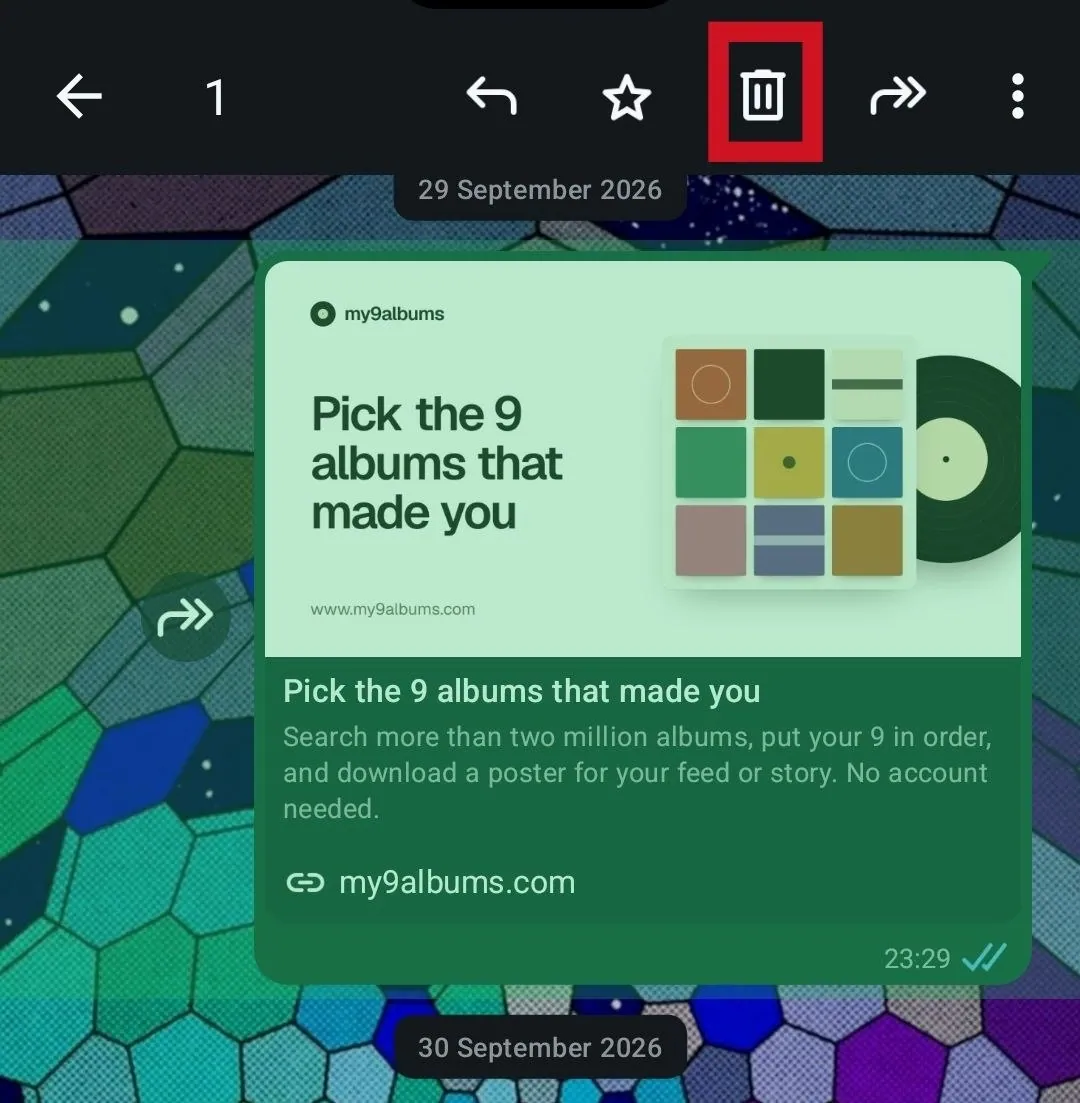
- WhatsApp will display a pop-up window. To delete the file you received from your device, you have to check the corresponding box.
- To complete the process and delete the defamatory photo from your chat and device, you must tap “Delete for me“.
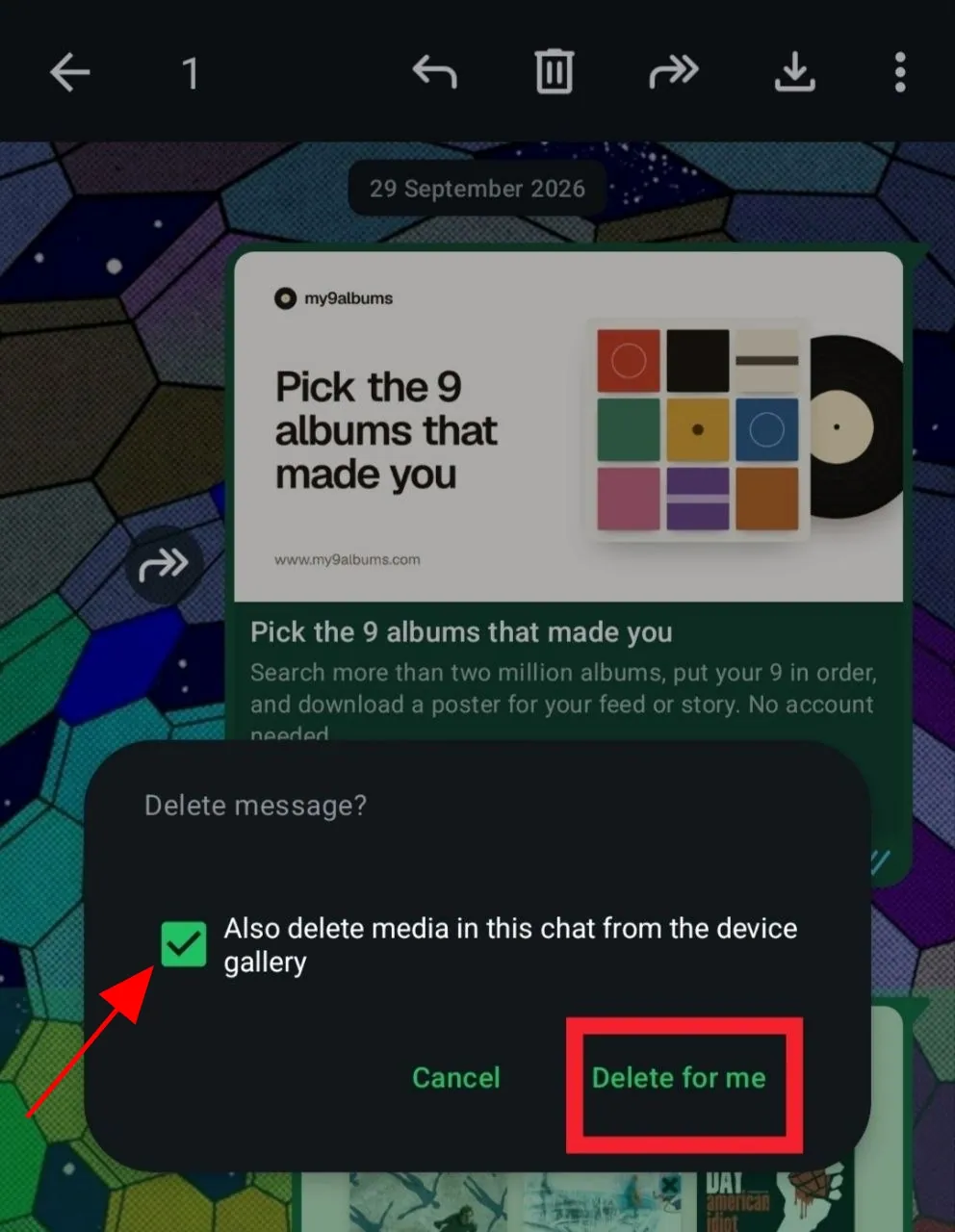
This way, you will delete the image from your personal chat with the sender who sent you the file, although the photo will still be present on their side of the conversation and on their device.
Step-by-step guide to delete a defamatory photo in a WhatsApp group
If you are an admin of a WhatsApp group chat and a group member sent a controversial photo of you, you are authorized to delete this image so no one can see it. The procedure to delete the file from the chat is as follows:
- First, you need to open the group where you are an admin and locate the image you want to delete.
- Next, you have to select the trash can icon at the top of your screen.
- WhatsApp will display a pop-up window, as in the previous process. Here, you have the option to delete the file from your device in addition to the chat.
- To delete the photo from the group and prevent its members from seeing it, you have to select the “Delete for Everyone” option.
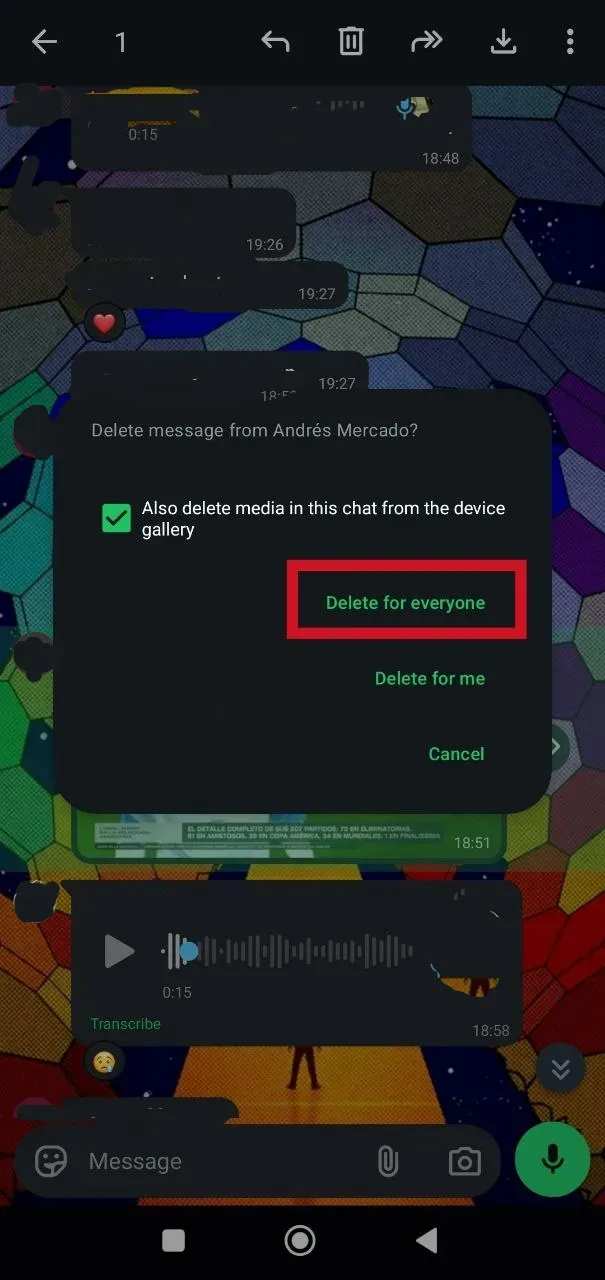
This process will remove the image from the group chat you manage. However, by the time you have deleted the photo, other users may have saved the file locally or forwarded it to private or group chats.
How can I remove the photo if I am not the group chat admin?
You can contact a group admin of the WhatsApp group and request that the photo be deleted before the 48-hour window that prevents the file from being fully removed for all chat users.
A second possible alternative is to contact the person who sent the image to the group directly and politely ask them to delete it.
Steps to delete defamatory photos saved on my device directly from WhatsApp
It is advisable to delete the locally stored copies of the defamatory photos you received on WhatsApp after removing the files from the individual or group chat. The app includes a procedure to make this easier:
- From the WhatsApp main screen, you need to tap the last icon on the right to access your profile settings.
- Next, you have to select the “Storage and Data” option to go to a menu showing how your device’s total storage is distributed and the percentage taken up by your WhatsApp files.
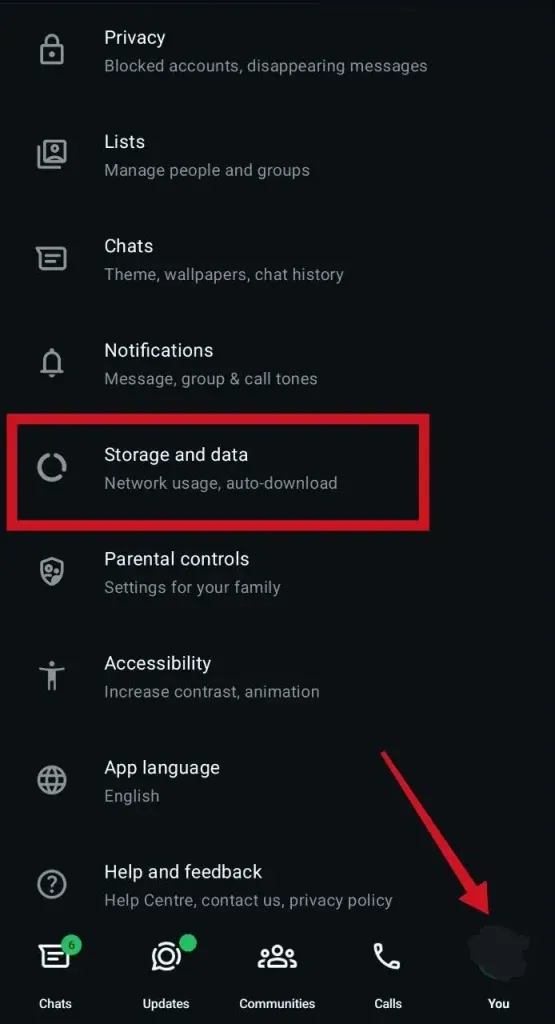
- In this menu, you need to select the individual or group chat that contains the photo or photos you want to delete and choose the files you want to remove.
- WhatsApp will show you a pop-up window indicating that this procedure will delete the file from the app’s media, but will not affect other copies saved on your phone. To finish, you can choose “Delete“.
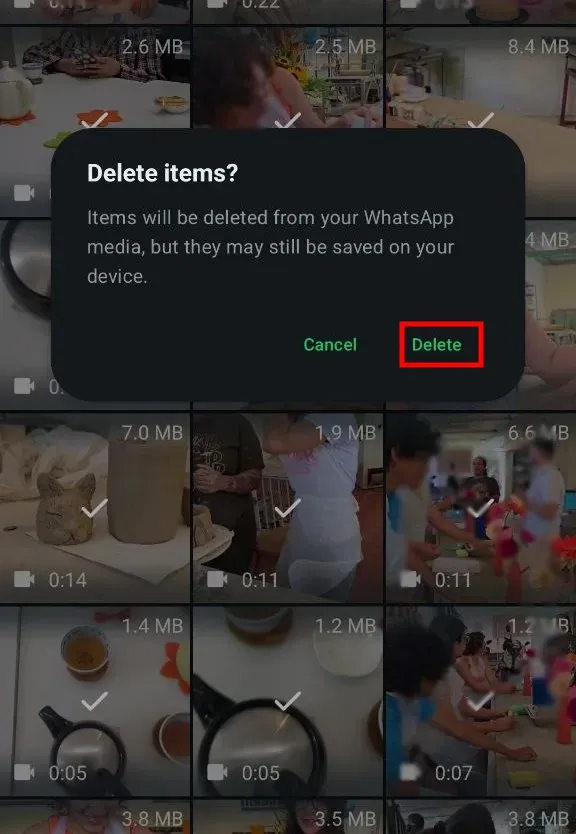
If your device holds copies of the photo other than those WhatsApp stores when auto-download is enabled, you will likely need to use your phone’s file explorer to delete the photos.
What to do when someone posted a defamatory photo of me on their WhatsApp status?
If someone posted a defamatory photo of you on their WhatsApp status, you can ask them to remove the content from their stories so none of their contacts can see it.
WhatsApp also includes the option to report users’ stories if their content violates the app’s rules. However, this procedure does not remove the story immediately, but rather depends on the verdict of Meta’s moderators.
Recommendations for handling a defamation case on WhatsApp
Taking the following suggestions into account tends to be very helpful for people or institutions facing a defamation attack on WhatsApp:
- Take screenshots: taking screenshots of the photos while they are still visible usually serves as proof that the images were in fact shared in the first place.
- Record the day and date the images were received: separately noting the exact moment the defamatory photos were shared is usually quite useful for the victim or victims involved.
- Identify the person or people involved: if possible, write down the phone number or username of the person or people who sent you the harmful photo or who shared it in WhatsApp groups, channels, or stories.
Finally, getting support from a content removal and reputation management company may be a good option for you if the defamation case on this app escalates and starts affecting your other digital channels.
Final thoughts on removing defamatory photos on WhatsApp

A defamatory photo of you circulating on WhatsApp is usually a very serious threat to your reputation and dignity as a person.
While it is very difficult to control what people may save on their devices once the photo is shared, deleting the file from the conversation is still a favorable measure to limit the content’s visibility, especially in groups.
With that said, the defamatory photo may not only spread on WhatsApp but also reach other digital channels. In this scenario, having content removal experts on your side tends to be a more than favorable measure.
At Media Removal, we can provide you with guidance so you fully understand your possible alternatives when facing a defamation case on WhatsApp or other platforms.
We invite you to schedule a meeting with our team of online reputation experts to receive a guidance session tailored to your situation.
 Subscribe to our newsletter
Reputation insights and industry news from the Media Removal team, straight to your inbox.
No spam. Unsubscribe anytime.