Over 300 companies trust Media Removal. Get a Quote Now >
How to create a Wikipedia page: Step-by-step guide 2026


By Pablo M.
Posted

Estimated reading time
Getting on Wikipedia is one of the most sought-after visibility and authority moves for companies, professionals, and public figures in the United States.
The difference compared to any other platform is enormous: Wikipedia doesn’t open profiles to whoever asks for one, there’s no quick button to publish your biography, and the community of editors reviews every new piece of content under very strict rules before accepting it.
There’s something else worth clarifying from the start: many people talk about “creating a Wikipedia page” when what they really want is an encyclopedic article that passes the filters of notability, verifiable sources, and neutrality.
The process is demanding, but it follows a clear path that anyone can take if they understand how the world’s most consulted encyclopedia works.
Wikipedia page vs Wikipedia article: what is the difference?
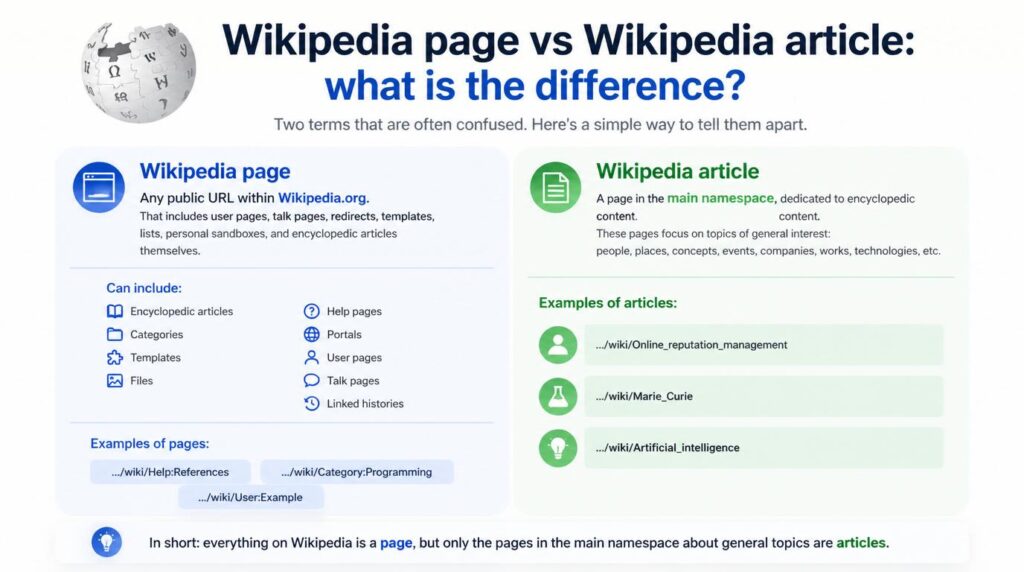
To understand what you actually have to create, it’s worth first separating two terms that get mixed up all the time in searches and everyday conversations.
Wikipedia page
A Wikipedia page is any public URL within Wikipedia.org. That includes user pages, talk pages, redirects, templates, lists, personal sandboxes, and encyclopedic articles themselves.
- Any Wikipedia page can include:
- Encyclopedic articles.
- Categories.
- Templates.
- Files.
- Help pages.
- Portals.
- User pages.
- Talk pages.
- Linked histories.
Some examples of pages can be:
- …/wiki/Help:References.
- …/wiki/Category:Programming.
- …/wiki/User:Example.
All of them are pages, but not all of them are articles. In a broad sense, anything that has an address inside Wikipedia is a page.
Wikipedia article
A Wikipedia article is a page located in the main namespace (also known as “main namespace”), that is, the section dedicated to the encyclopedic content of the site.
In this space, pages are published that focus on topics of general interest, such as people, places, concepts, historical events, companies, cultural works, or technologies.
For example, pages like:
- …/wiki/Online_reputation_management.
- …/wiki/Marie_Curie.
- …/wiki/Artificial_intelligence.
These typically belong to the main namespace and are therefore considered encyclopedic articles.
How to tell when it’s a Wikipedia article (and when it’s not)
To recognize whether a URL corresponds to an article, a practical way is to look at what appears after /wiki/.
- If only the title of the topic appears, with no additional prefixes, it’s usually an article.
- On the other hand, when the title includes prefixes like “Category:”, “Help:”, “User:”, “Template:”, “File:”, or “Wikipedia:”, it’s not an article but a page that belongs to other internal areas of the platform and not to the main encyclopedic content.
An important detail is that articles are also the only type of content that can feed a Knowledge Panel and rank in the top results.
If you want to understand how your presence on Wikipedia connects with what Google shows, you can check our guide on how to get a google knowledge panel for your business.
What Wikipedia requires before accepting a new article
Wikipedia rejects hundreds of thousands of drafts every year, and almost always for the same reasons.
Before investing time in writing, it’s worth checking whether the topic meets the project’s minimum standards.
There are three pillars that no new article can skip:
- Notability: the subject of the article must have significant coverage in independent and reliable sources; brief mentions or sponsored reviews are not enough.
- Verifiability: every claim must be backed by an external source that anyone can consult.
- Neutral point of view: the text cannot read as self-promotion, marketing, or personal defense of the subject.
To these three pillars, two additional rules are added that filter out many drafts:
- The prohibition of original research.
- The strict rules on conflict of interest, which especially affect those trying to write about themselves or their company.
To go deeper into how the notability of a person or brand is evaluated within the ecosystem, you can review Wikipedia's policies and guidelines.
How to create a Wikipedia article: step-by-step process
Once you're clear that your topic meets the requirements, the next step is to execute the process within the platform.
The route looks simple on the surface, but each step hides details worth taking care of to avoid rejections.
- First, go to Wikipediafrom your browser, and in the upper right corner you'll see two links: “Create account” and “Log in”.
- Then, if you don't have an account, you should click “Create account” and complete the form with a username, a password, and a recovery email.
- After logging in, type into the search bar the exact title your article will have (for example, the full name of the person, company, or organization). If Wikipedia doesn't find any results, it will display a red message with a link that says “create the page” or will suggest using the Article Wizard.
- Next, click the red link to open the blank editor, and if your account is new, the most advisable thing is not to publish directly in the main namespace. First, you should work the draft in your personal sandbox or use the Article Wizard so the system guides you step by step.
- After that, you should write the content respecting the standard structure of any encyclopedic article: an introductory paragraph (lead) summarizing who or what the subject is, sections with clear headings, data backed by reliable sources, and references added with templates like {{cite news}}, {{cite web}}, or {{cite book}}.
- Finally, when the draft is complete, click “Publish page” if you're working in your sandbox, or send it to the review circuit by clicking “Submit your draft for review” within Articles for Creation.
After this, a volunteer editor will evaluate it and, if it meets the rules, will move it to the main namespace.
Each of these steps matters in itself, but the order matters too: skipping the account or trying to publish without going through review is one of the most frequent reasons why a first attempt ends up deleted within hours.
Common mistakes when creating a Wikipedia article
Rejections in Articles for Creation are rarely arbitrary, and they almost always follow repeated patterns that any experienced reviewer detects within minutes.
Writing about yourself or your own company without disclosing conflict of interest
The first (and most common) is writing about yourself or your own company without disclosing the conflict of interest.
Wikipedia doesn't prohibit a related user from preparing a draft, but it requires disclosing the link and, in many cases, referring the case to an independent editor.
Using weak or unreliable sources
Another very common mistake is building the article on weak sources: press releases, sponsored notes, personal blogs, LinkedIn profiles, or the subject's own website.
None of those sources carry enough weight in the notability evaluation.
Promotional or advertising language
Texts loaded with promotional language are also quickly rejected.
Adjectives like “leader”, “innovator”, “pioneer”, or “world-renowned” are removed immediately. Wikipedia requires a descriptive tone, based on verifiable facts, not on judgments or marketing.
Copyright issues and plagiarism
You can't have content that already exists on other sites.
Added to these errors are important technical problems, such as the total or partial copying of texts from other web pages, which constitutes a copyright violation and leads to immediate deletion of the content.
Using AI-generated content without verification
Finally, the indiscriminate use of AI-generated content without source verification is also a serious problem.
Reviewers usually detect it quickly when there are no solid references, and in the current context (2026) this type of content is subject to especially strict scrutiny.
Useful resources for creating your Wikipedia article
Wikipedia offers a series of help pages designed precisely for new users. Knowing them before you start saves a lot of rejections and rewrites.
These are the official resources you should keep open throughout the process:
- Wikipedia:Article wizard: the step-by-step assistant that helps new users draft and submit their first article.
- Help:Your first article: official guide with advice on structure, sources, and mistakes you should avoid.
- Wikipedia:Notability: key page for understanding whether your topic meets the minimum criteria before writing.
- Wikipedia:Reliable sources: catalog of which sources are accepted as backup and which are not.
- Wikipedia:Conflict of interest: essential document if you're going to write about your company, brand, or yourself.
Having these resources at hand can make the difference between a draft that's approved on the first review and another that circulates for weeks among partial rejections and rewrites.
When to consider professional help with your Wikipedia article
Although the platform is open and anyone can collaborate, the reality is that creating an approved article for a brand, a founder, or a public figure requires a combination of editorial judgment, knowledge of internal policies, and experience detecting objections before they appear.
For example, at Media Removal we've been able to observe that projects combining solid documentation with neutral writing and knowledge of “Articles for Creation” processes have clearly higher approval rates.
If you want to see a comparison of companies dedicated to this service, you can review our list of the top 5 wikipedia publishing agencies.
Frequently asked questions about creating a Wikipedia article
Below we answer some of the most frequent questions users send us when planning to have their first article and that aren't covered in the previous sections.
Protecting your presence on Wikipedia after publication
Creating an article on Wikipedia is not the end of the process; it's the beginning of a presence that lives on a platform edited by thousands of people. Any user can modify, question, or nominate your entry for deletion at any time.
Having an approved article opens real doors (more visibility on Google, presence in Knowledge Panels, greater credibility before press, investors, or clients), but it also requires constant follow-up to detect malicious edits, outdated data, or attempts at deletion.
The investment you made to reach the main namespace is only protected if someone watches the entry regularly and reacts with editorial judgment when a suspicious change or a notability debate appears.
If you need support to create, maintain, or defend a Wikipedia article, at Media Removal we have a team of online reputation experts familiar with Articles for Creation processes, conflict of interest policies, and online reputation management.
If you’d like to review your case, you can request a quote and share the project details so our specialists can evaluate the best strategy for your particular situation.