Summarize this post with:
For personal brands, entrepreneurs, and any public figure, having a Quora account can be a cause for concern.
This is especially true if that exposure contains information that directly affects their professional image. That’s when they may start wondering how to delete their accounts.
If this is your situation, keep in mind that you can completely delete your profile from the platform, even if you no longer use it.
How to delete your Quora account: step by step
To delete your Quora account, go to “Settings,” select “Delete Account” under “Privacy,” and confirm the request with your password. Then, stay logged out for 14 days.
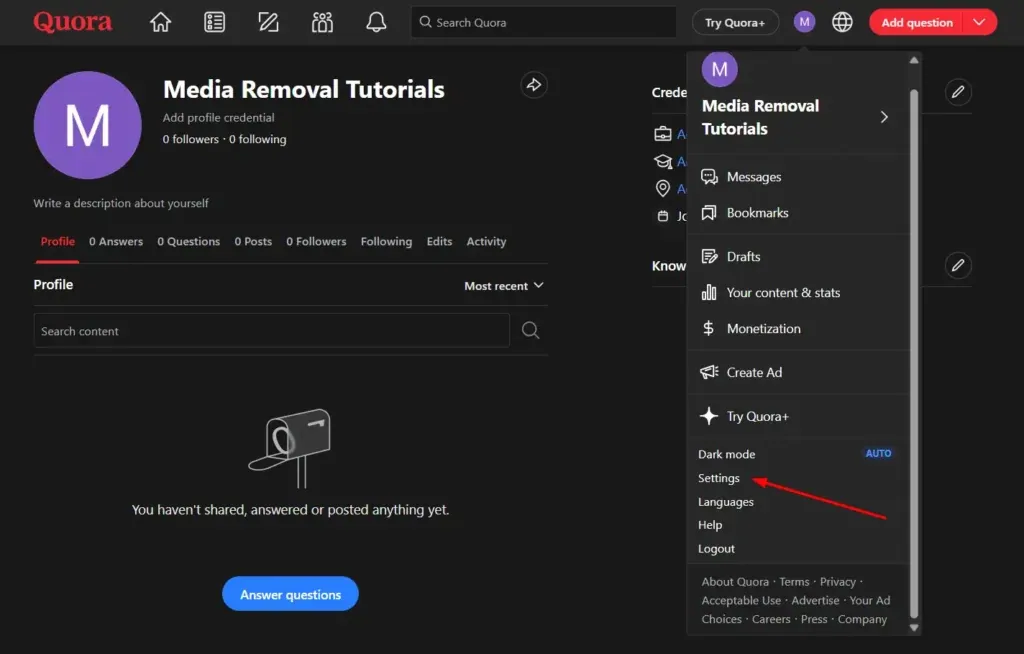
Step 1. Sign in to Quora and open “Settings”
You can sign in to Quora with the email address and password linked to your profile. If you created your account using Google or Facebook, you can also sign in that way.
Once you’re logged in on a computer, click on your profile picture in the top right corner and open “Settings” to find your account management options. You can also go directly to Quora’s privacy settings. In the app, the menu may look different depending on your device.
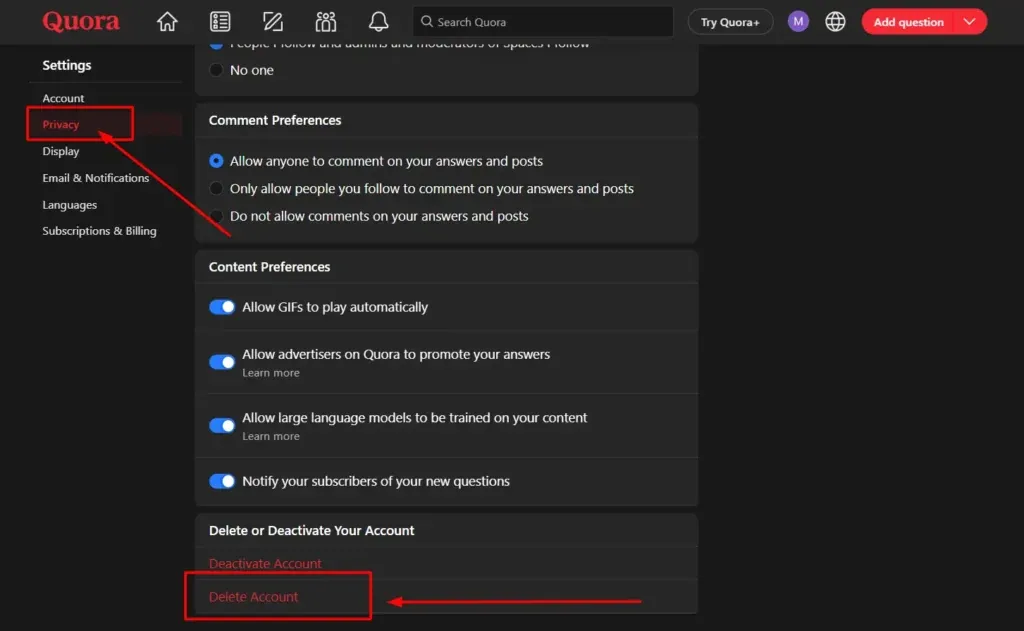
Step 2. Go to “Privacy” and select “Delete Account”
In “Settings,” find “Privacy” in the menu on the left side, then scroll to the bottom of the page. There you’ll see the “Delete Account” option.
Keep in mind that “Delete Account” and “Deactivate Account” are different options. To permanently delete your profile and request removal of its associated data, select the first one.
Step 3. Enter your password and confirm deletion
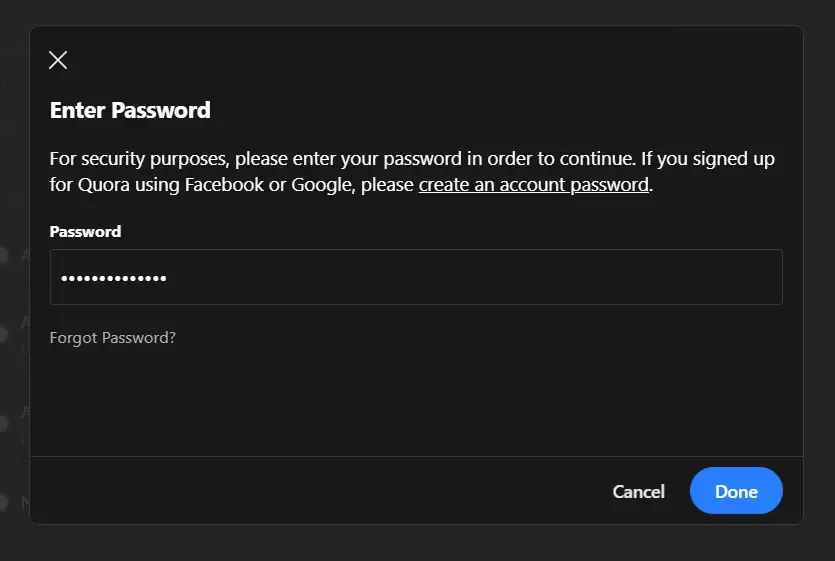
You’ll be prompted to enter your account password to confirm deletion. Once you’ve entered it, you can approve the request and start the process.
If you signed up through Google or Facebook and don’t have a Quora password, you’ll first need to create one. To do that, use the “Change Password” and “Create an Account Password” options in your settings.
Step 4. Stay logged out during the 14-day grace period
After you confirm the request, your account is deactivated immediately and the 14-day grace period begins. You can still cancel the deletion during that time.
If you sign back in, the platform will reactivate your account and stop the process. That’s why you need to stay logged out for the full 14 days to complete the permanent deletion.
What happens after you delete your Quora account?
After you delete your Quora account, your profile and posts are no longer publicly available. However, some questions and copies of content shared outside the platform may remain visible.
Once the deletion process is complete, here’s what happens:
- Your profile disappears: your profile picture, bio, and other details associated with your public profile are permanently removed.
- Your contributions are removed: Quora takes your answers, comments, posts, votes, and messages out of public view.
- Questions you asked remain: they’re still available to the community, but they’re no longer publicly linked to your name. Keep that in mind.
- Content shared outside Quora may still be visible: copies of your content or data hosted on other sites and forums don’t automatically disappear when you delete your account.
Note that Quora may also keep certain data when necessary to meet legal obligations.
So, if you’re trying to protect your privacy and keep old posts from affecting your reputation, we suggest checking what information is still publicly available after your account has been deleted.
Why can questions you asked still appear on Quora?
Because Quora considers them part of its community content. So they remain visible to other users, even though they’re no longer publicly linked to your name.
So, if you can still access your account, we suggest reviewing questions you’ve asked in the past and want removed. Here’s what to keep in mind:
- Personal information: check whether any questions contain details that could affect your reputation. This includes information that acquaintances and potential clients could use to identify you easily.
- Deleting individual questions: if you want to delete a question, use its three-dot menu, but only while that option remains available.
- Reports: if a question violates Quora’s rules, you can report it and request a review.
Delete vs. deactivate your Quora account: what’s the difference?
The main difference is that deactivating your Quora account is temporary, while deleting it is permanent.
Both options let you stop using the platform, but they affect your posts differently.
For example, when you deactivate your account, you stop receiving Quora emails and notifications. However, your answers and posts remain available. Also, you can reactivate your profile at any time simply by logging back in.
By contrast, when you delete your account, Quora removes your profile and related content, except for contributions that belong to the community, such as questions. Once the 14-day deletion process is complete, you can no longer recover your account.
What to do if you can’t delete your Quora account
If you can’t delete your Quora account, the first step is to identify what’s stopping the process, such as a sign-in error. Depending on the issue, you can reset your password, try another sign-in method, or ask the platform’s support team for help.
Here are the main options to consider:
- Reset your password: if you’ve forgotten it, you can request a reset link at the email address associated with your account.
- Try another sign-in method: if you signed up using your Google or Facebook account, you can try logging in through those services.
- Contact Quora: if you no longer have access to your email to complete the deletion, you can explain your situation through the official support form.
But what if your main concern is that old posts could still affect your reputation? In that case, it’s also important to check what information remains publicly available.
For example, Media Removal documented the case of Zakk Colburn, a fitness industry business owner whose reputation was affected by harmful Reddit posts that appeared when people searched for his name on Google.
The team worked to remove that content and improve his presence in search results.
Although this happened on another platform, the example shows why deleting a profile doesn’t always solve every problem related to online exposure.
If you’re in a similar situation, Media Removal’s online reputation management services can help you assess which content is still published and relevant to your reputation, identify possible grounds for requesting its removal, and explore the options available for your case.
What if you don’t have a Quora password?
If you don’t have a Quora password, you can create one if you signed up through Google or Facebook, or reset it if you forgot it. The platform requires a password to confirm deletion of your account.
If you used Google or Facebook, go to “Settings,” select “Change Password,” and then “Create an Account Password.” Once you’ve created it, you can continue with the deletion request.
On the other hand, if you forgot your password, you can request a recovery link from the sign-in screen. Quora will send it to the email address associated with your profile. If it doesn’t arrive, we suggest checking your spam folder too.
Why is my Quora information still showing up in Google?
Your Quora information may still appear on Google because the search engine hasn’t updated its results yet. It’s also possible that some posts remain available on the platform even after you’ve deleted your profile.
According to the official documentation in the Google Help Center, two situations can explain why this happens:
- The content was removed from Quora but still appears on Google: in its Refresh Outdated Content guide, Google explains that page descriptions can keep showing old information. To fix this, you can enter the affected URL and request an update to the result.
- The information is still published on Quora: under Google’s policy for removing private information, you can request the removal of results that expose sensitive details, such as your home address, phone number, or identity documents. The platform reviews each case before deciding whether to remove the result.
For example, if you deleted an old answer but Google still shows part of its content, you can ask the search engine to update that result.
On the other hand, if a question is still published and contains sensitive personal information, you can check whether it meets the requirements for removal.
Keep in mind that removing a Google search result doesn’t mean deleting the original Quora post or copies circulating elsewhere on the internet.
So, if you want to protect your personal or professional reputation, we suggest checking both the information that remains on the platform and what appears when someone searches for your name or your company’s name.
Conclusion: protect your personal information beyond Quora
Now that you know how to delete your Quora account, you can pay closer attention to the information you want associated with your name, particularly if your online presence influences how much clients, colleagues, and followers trust you.
And remember, not all content poses the same risk to your reputation. That’s why it’s best to identify which posts could harm you and prioritize those that need the most urgent attention.
At Media Removal, we can assess your situation and guide you through the options available to protect your online reputation.
We invite you to meet our team and request a quote for personalized guidance.
 Subscribe to our newsletter
Reputation insights and industry news from the Media Removal team, straight to your inbox.
No spam. Unsubscribe anytime.