Over 300 companies trust Media Removal. Get a Quote Now >
How to Remove Negative Posts from Facebook Groups

By Pablo M.
Posted

Estimated reading time
Few things are more unsettling than opening Facebook and finding your name, your business, or a photo of you exposed inside a group you never asked to be in.
A single accusation, paired with a few comments, can reach thousands of people in hours and even end up among the first Google results tied to your name.
The most frustrating part is usually the sense of helplessness from not having any control over the group, often not even knowing the author, and yet being the one carrying the reputational damage.
What almost no one realizes is that this situation has a way out, and that there are concrete paths to regain control of what is being said about you inside Facebook.
Can you actually remove a post from a Facebook group if you didn’t write it?
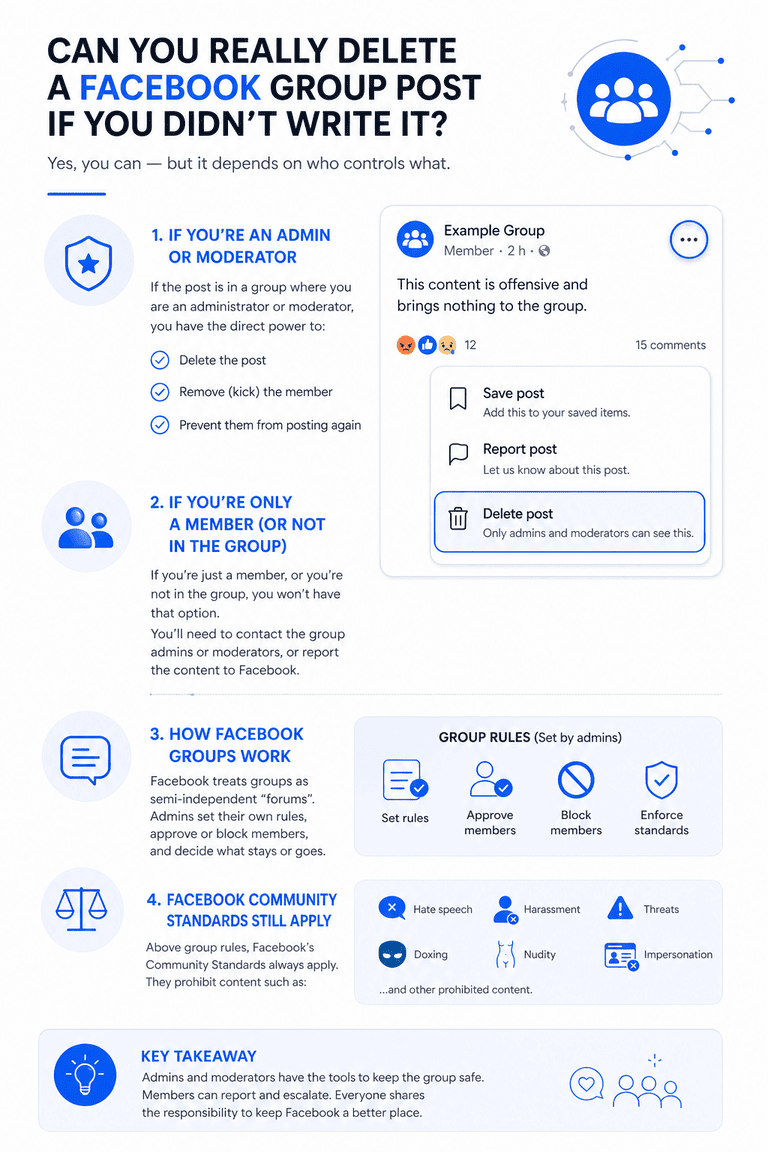
Yes, you can, but the path depends on who controls what.
If the post is in a group where you’re an admin or moderator, you have direct power to delete it, remove the member, and prevent them from posting again.
However, if you’re just a member, or you’re not in the group, you don’t have that option and you’ll have to go through the group’s admins or Facebook’s moderation teams.
Facebook treats groups as spaces similar to semi-autonomous “forums”, where admins set their own rules and approve or block members.
On top of that, Facebook’s Community Standards still apply, covering hate speech, harassment, threats, doxxing, nudity, impersonation, and other categories.
Steps to remove a negative post from a Facebook group
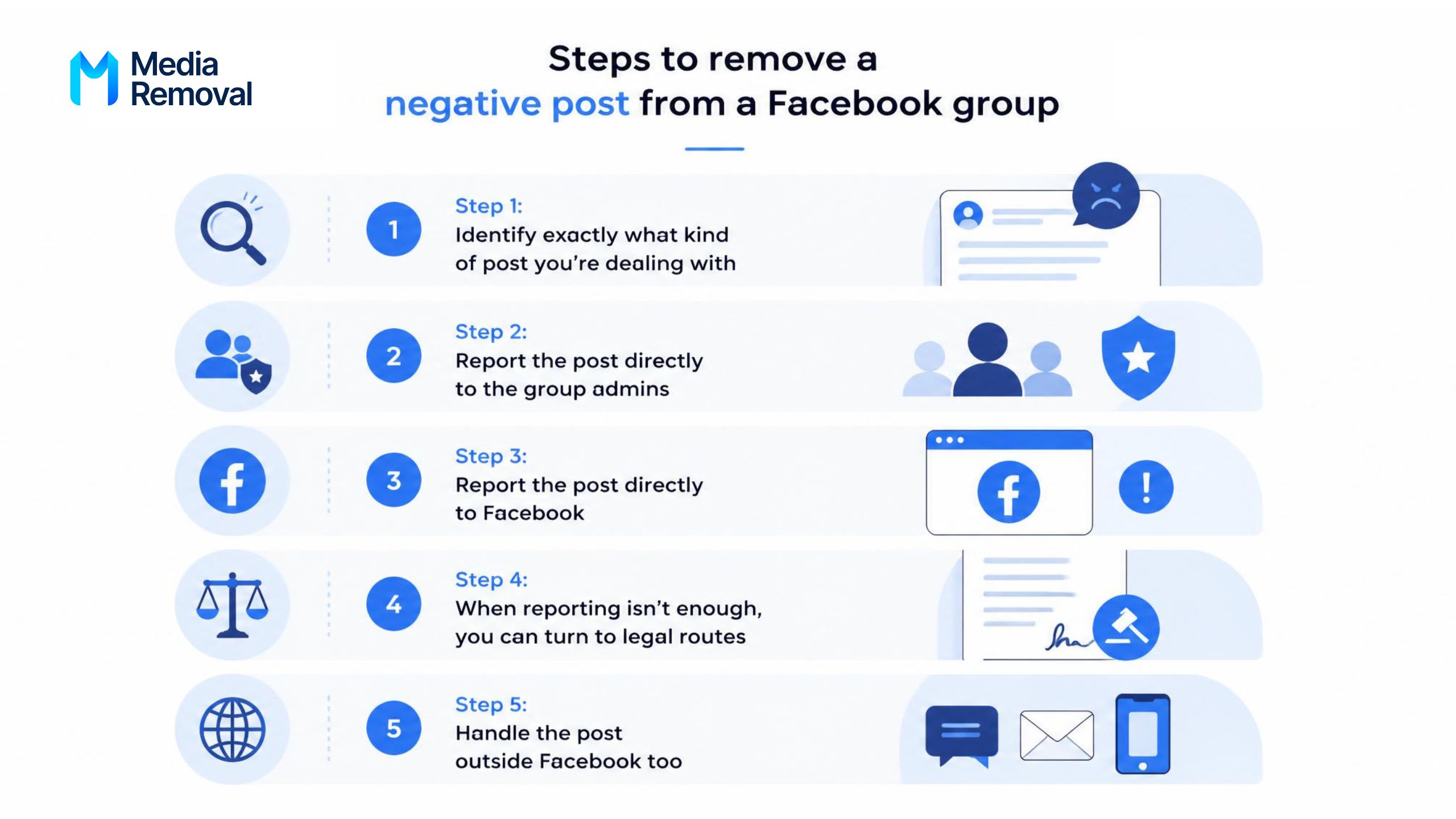
To remove negative posts from Facebook groups, you have two doors to knock on:
- First, the group admins.
- If the admins don’t act or if the post breaks the platform’s Community Standards, you can use Facebook’s reporting system.
If you go with the second option, Facebook will step in on that post and, if it breaches the Community Standards, will consider taking the post down.
Step 1: Identify exactly what kind of post you’re dealing with
Before reporting anything, slow down for five minutes and document the post, since this is the part most people skip, and it’s exactly the part that decides whether the next steps work or not.
You’ll need a clear record of:
- A full screenshot showing the post, the author’s name, the group name, and the date and time.
- The direct URL of the post (right-click on the timestamp and copy the link).
- The exact name and URL of the group.
- The username and profile URL of whoever posted it.
- Any comment under the post that adds context, especially threats or repeated harassment.
If the post mentions your name, includes your photo, your phone number, your address, your workplace, or any data that identifies you personally, that detail weighs heavily.
Posts that reveal private information about a real person fall under stricter rules and Facebook handles them faster than generic complaints.
Step 2: Report the post directly to the group admins
If you’re a member of the group, this is the fastest route.
Admins can delete a post in seconds, and many do, especially if it breaks the group’s internal rules.
Here’s the exact flow on desktop:
- First, open the group and find the post you want to report.
- Then, click the three dots (•••) in the top-right corner of the post.

- Next, select “Report to admins” from the dropdown menu.
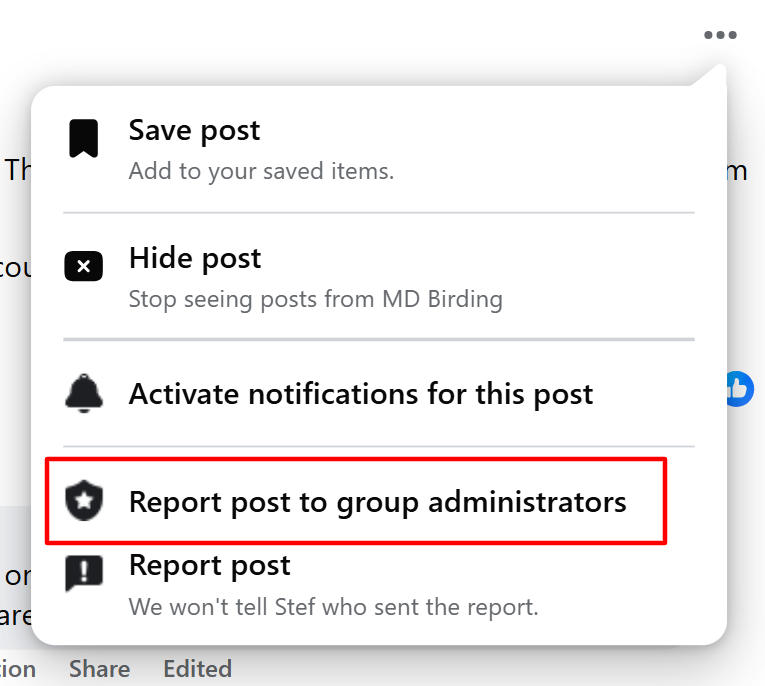
- After that, choose the reason that best fits (harassment, false information, scam, hate speech, etc.).
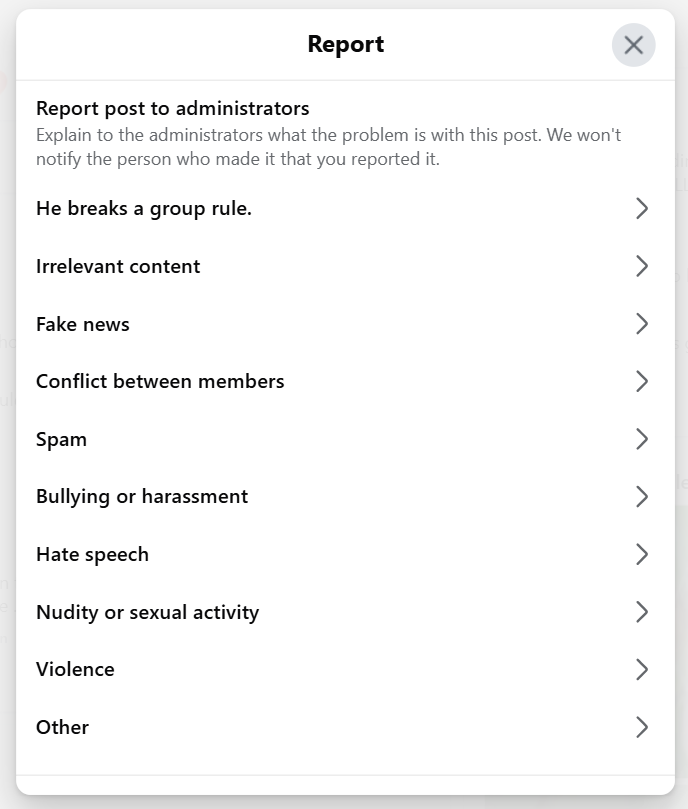
- Finally, add a short note explaining why the post should come down and submit the report.
On mobile the steps are nearly identical. Tap the three dots on the post, choose “Report to admins”, pick a reason, and confirm.
Reports to admins don’t reach Facebook, so if the admin ignores the alert or actively protects the author, the path stops there. Some admins also moderate dozens of groups and may not see your report for hours or days.
Step 3: Report the post directly to Facebook
If the admins won’t help, or if the post violates Facebook’s Community Standards (not just the group rules), you need to escalate the post to Facebook directly.
The steps are slightly different from reporting to admins:
- First, click the three dots (•••) in the top-right corner of the post.
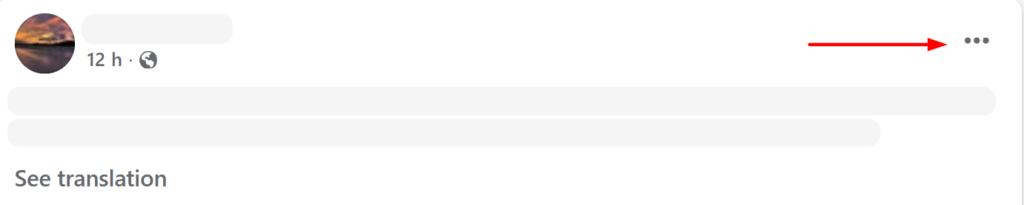
- Then, select “Report post” instead of “Report to admins”.
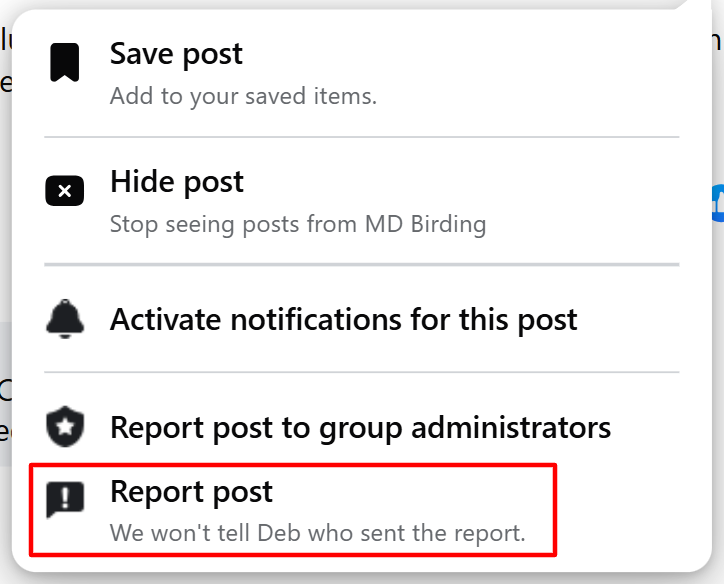
- Next, choose the category that best describes the issue: harassment, bullying, false information, hate speech, nudity, violence, self-injury, unauthorized sales, or “Something else.”
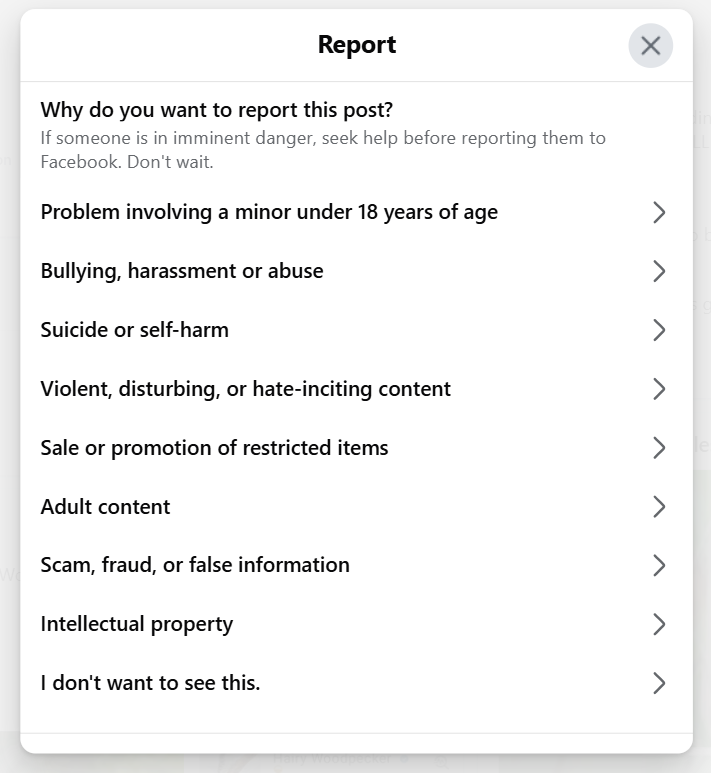
- After that, follow the prompts. Facebook may ask whether the post is targeting you, someone you know, or a protected group.
- Finally, submit the report and save the confirmation. Facebook will notify you when the report has been reviewed, and you can track it from your Support Inbox.
Two practical tips:
- The category you choose determines which moderation team reviews your report, so be precise.
- The second tip is to repeat: if the post is still up after one report, you can report it again, and other people can too, and multiple reports from different accounts are reviewed together and carry more weight than a single complaint.
Step 4: When reporting isn’t enough, you can turn to legal routes
Facebook reviews millions of reports a day, and not every harmful post triggers an automatic removal.
If the post is genuinely damaging and the platform’s first review responds with “this doesn’t violate our Community Standards,” you still have options that go beyond the standard report button.
Defamation
If the post states something false about you or your business as fact, defamation laws in most countries give you a path to removal.
You’ll usually need a lawyer to draft a formal demand or a takedown letter citing the specific false statements and the harm they cause.
Privacy violations and doxxing
Posts that share your address, phone number, financial information, ID documents, or photos taken in private settings fall under privacy violations.
Facebook has a dedicated path for reporting privacy issues that’s separate from the standard flow, and these requests are typically handled with priority.
Copyright infringement (DMCA)
If someone in a group posted a photo, video, logo, or text whose rights belong to you, you can file a DMCA notice through Facebook’s official intellectual property form.
This is one of the fastest legal routes because the platform is legally required to act on valid copyright complaints.
Threats and impersonation
Direct threats, posts encouraging others to harass you, or accounts pretending to be you can be escalated through Facebook’s harassment and impersonation reporting paths, which trigger faster reviews than general complaints.
If the harassment is coordinated across several accounts, I recommend documenting each one, since coordinated inauthentic behavior is one of the highest-priority enforcement categories for the platform.
Step 5: handle the post outside Facebook too
Removing the post from the group is only half the job.
If the group is public, Google has likely already indexed the post, and the URL can keep showing up in search results tied to your name long after it disappears from Facebook.
How do you remove the Facebook group post if it appears on Google?
Once removed inside Facebook, the URL will eventually return a “content not found” error.
However, if the post still appears in Google’s search results, you can submit the dead URL to Google’s outdated content removal tool, which speeds up the process of clearing it from search results.
Frequently asked questions
A few questions come up over and over among people trying to clean up Facebook groups, and most of them aren’t answered above.
Final recommendations to protect your reputation in Facebook groups

A harmful post inside a Facebook group can damage your reputation faster than most people imagine, and the platform’s reporting tools, while real, aren’t always enough on their own.
The fastest results usually come from combining the routes: report to the admin, report to Facebook in parallel, and document everything in case you need to escalate to a legal route.
If the post identifies you personally or stays up after several reports, that’s the moment to seek professional help instead of repeating the same report a fourth time.
If a Facebook group post is hurting your name or your business and the standard reports aren’t working, Media Removal can step in.
Our team of online reputation experts handles Facebook removal cases from start to finish, including legal escalations when the platform’s first review doesn’t deliver.
You can request a quote and share the post URL so our specialists can review the case and tell you exactly what’s possible.

Take control of your online reputation
We can review your case and offer a personalized solution to help you take back control of what’s being said about you or your business online.