Over 300 companies trust Media Removal. Get a Quote Now >


By Jordan M
Posted

Estimated reading time
Seeing an Instagram account that doesn’t belong to you cause problems in your life can be deeply unsettling.
Whether it’s a fake profile, impersonation, or harmful content, the feeling of losing control over your own image is hard to ignore.
What makes these situations even more stressful is the uncertainty. You may know something is wrong, but not whether you can actually do anything about it, or how far the consequences might go if the account stays active.
Understanding what’s truly possible, what isn’t, and how Instagram handles these cases is the first step toward regaining control of your online reputation and learning how to remove content on Instagram that could damage your image.
When can you remove someone’s Instagram account?

Instagram may suspend or permanently remove an account when it violates its Community Guidelines or Terms of Use, as in the following cases:
- Impersonation and identity theft: accounts that pretend to be another person or brand by using names, photos, or personal details without permission.
- Harassment, bullying, and threats: profiles that repeatedly engage in abusive behavior, intimidation, hate speech, or direct threats.
- Illegal or harmful content: sharing content related to criminal activity, exploitation, violence, or the sale of prohibited substances.
- Privacy violations and data exposure: accounts that publish private information such as addresses, phone numbers, or personal documents without consent.
- Spam, bots, and fake accounts: profiles created to automate interactions, send spam, manipulate engagement, or deceive users.
While users cannot delete accounts themselves, certain behaviors increase the likelihood of platform intervention after a review.
How to take down a someone else’s Instagram account
To remove another person’s Instagram account, it is necessary to report the account, comment, or Instagram post.
This way, Instagram will begin a review process and, if it finds a violation of the community guidelines, it will proceed to remove or ban the Instagram account.
To report an Instagram account and proceed with its review and subsequent deletion, you must complete the following steps:
- Start by visiting the Instagram profile you want to report. Once you’re on the profile, tap the three-dot menu (⋮) located in the top corner.
- From there, select the “Report” option.

- Next, choose “Something about this account” if you want to report the entire profile, or “Specific posts” if you’re reporting a particular piece of content.

- Then, select the reason why you’re reporting the Instagram account.

- After submitting the report, you also have the option to block the account.

Depending on the outcome, Instagram may take actions ranging from a warning to the permanent removal of the account.
How to report and delete a fake Instagram account for impersonation
For cases of impersonation, Instagram offers a dedicated process for these situations, in which you will need to fill out the Instagram impersonation report form.
To complete this form, you must follow these steps:
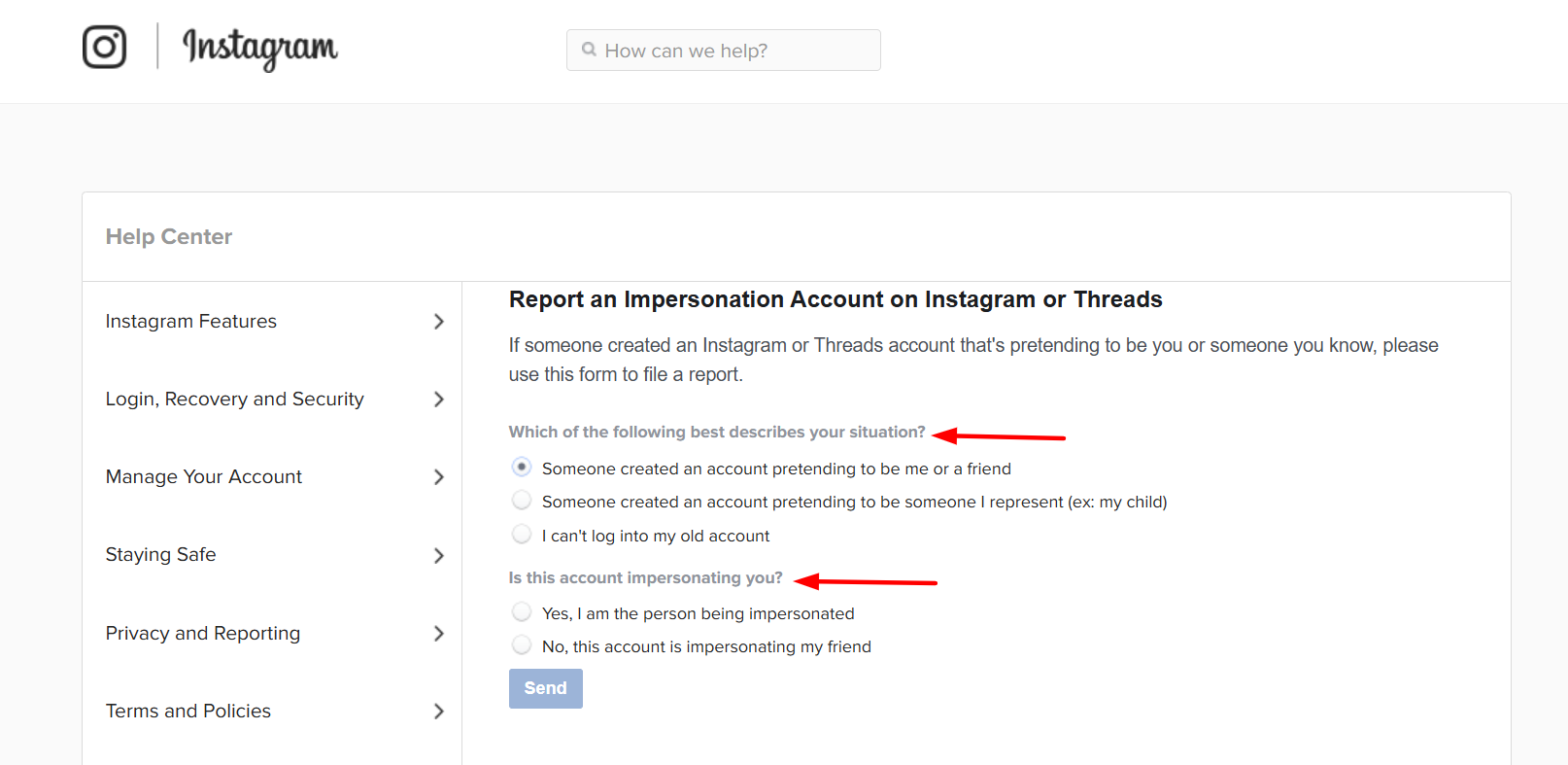
- First, you must go to the form and select the appropriate options under “Which of the following best describes your situation?” and “Is this account impersonating you?”.
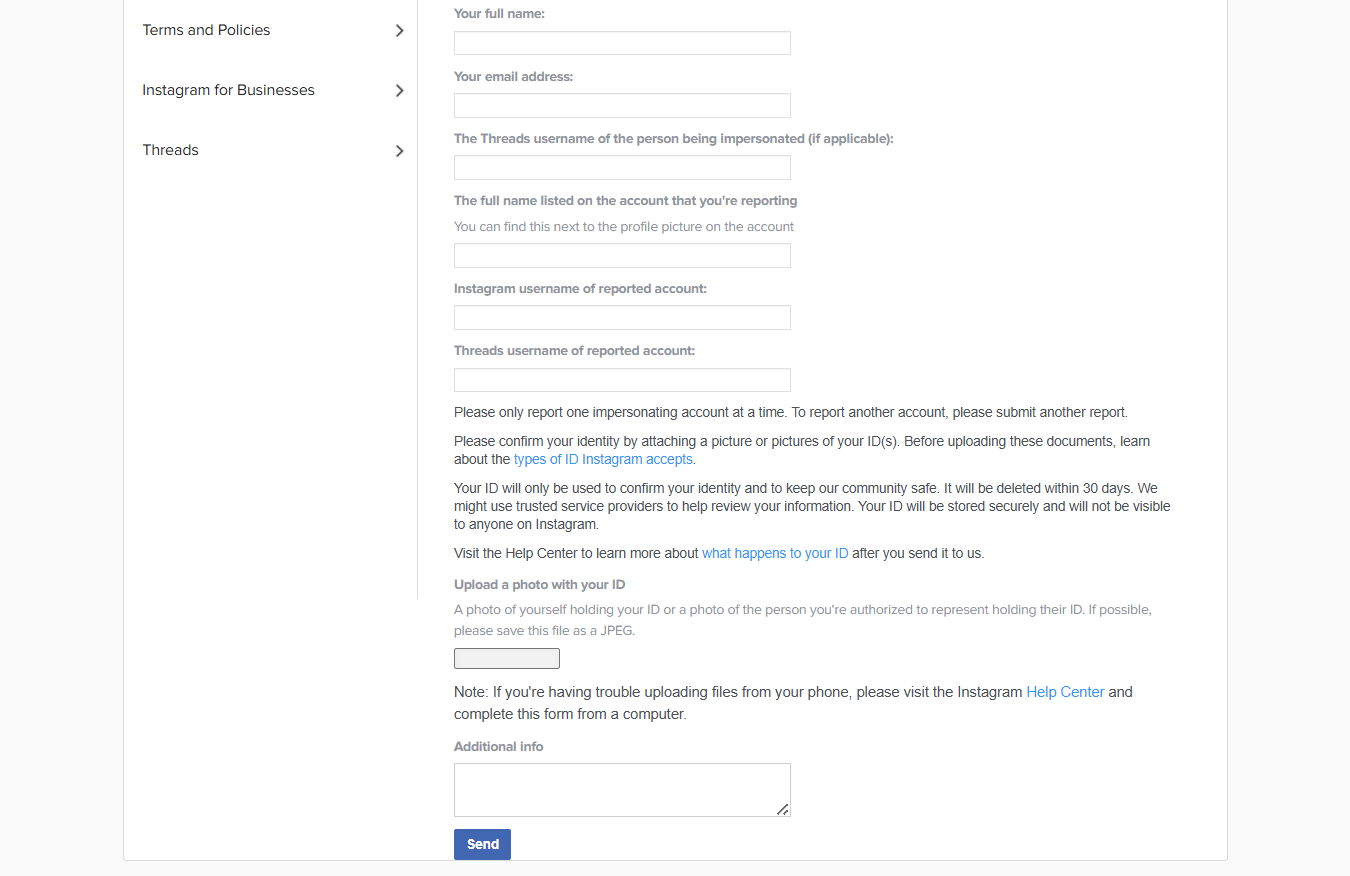
- Then, you must complete the required information in the form and take a photo of yourself holding your ID (DNI).
- Finally, click “Send” to submit the form.
Additionally, if you wish, you can report any account, post, or comment from the app using the “report” option (as we explained earlier).
However, this form is much more complete and specific for cases of impersonation (which is a legal issue).
What happens after you report an Instagram account
Once a report is submitted, Instagram begins an internal review to determine whether the account or specific content violates its Community Guidelines or Terms of Use.
This assessment may involve automated detection systems and, in certain cases, human moderators who evaluate the context, severity, and frequency of the reported behavior.
What happens during the review and If Instagram confirms a violation
If Instagram confirms that a violation has occurred, it may take different enforcement actions based on the seriousness of the case.
These actions can range from issuing warnings and applying temporary restrictions to suspending the account or permanently removing the profile in more severe or repeated situations.
Frequently Asked Questions About Removing Instagram Accounts
When dealing with Instagram account removals, it’s normal for questions to come up.
Below are some of the most common questions people ask when trying to understand their options and make informed decisions.
How to regaining control when an Instagram account harms you
Facing a harmful Instagram account can feel overwhelming, especially when you don’t have direct control over its removal.
Even so, understanding how the platform works and which actions are legitimate gives you back a sense of control. Acting calmly and strategically is often more effective than reacting impulsively.
Protecting your online reputation on Instagram isn’t just about removing a single account. It also involves limiting exposure, properly documenting the issue, and using the right tools at the right time.
It’s also important to remember that there are situations where professional support becomes necessary, particularly when impersonation, harassment, or reputational damage continues.
In those cases, having expert guidance can speed up the process, help you avoid mistakes, and better protect your digital presence.
If an Instagram account is affecting your image, your business, or your peace of mind, taking safe and legitimate action is always the best approach.
And if you need support with a complex situation, Media Removal can help you handle it strategically and regain control of your online reputation.

Take control of your online reputation
We can review your case and offer a personalized solution to help you take back control of what’s being said about you or your business online.