Over 300 companies trust Media Removal. Get a Quote Now >
How to Delete a Trustpilot Account: Complete Guide 2026

By Pablo M.
Posted

Estimated reading time
Trustpilot has established itself as one of the most influential review platforms globally, and that very relevance creates an increasingly common dilemma among its users: wanting to leave the platform and realizing that the process is not as simple as they initially thought.
For businesses, the problem is often even greater.
Discovering that certain parts of their presence on the platform remain visible even after attempting to unsubscribe can become a real nightmare, especially when negative, false, or malicious reviews are involved.
In this guide, you’ll understand which accounts you can actually delete on Trustpilot, what will remain public no matter what, and what alternatives you have when you cannot delete your account.
Types of Trustpilot accounts
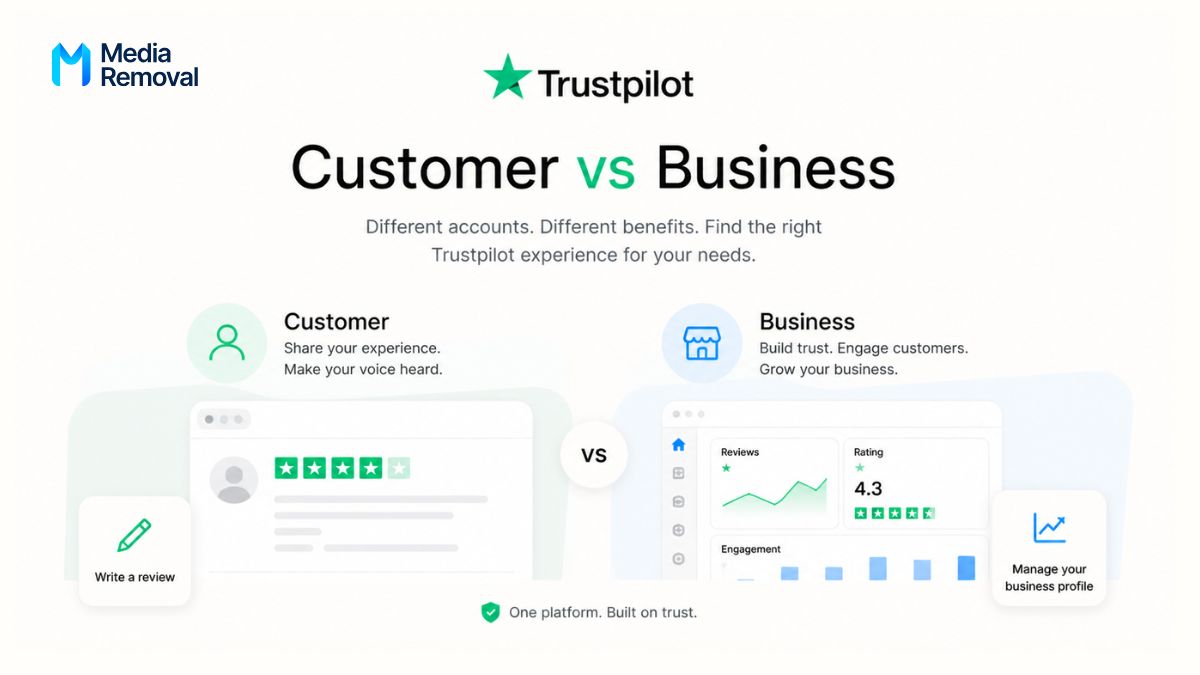
On Trustpilot, there are two distinct types of accounts: the personal (or consumer) account and the business account.
The difference between them is quite simple:
- Consumer account: the account anyone can create to leave reviews about businesses and services.
- Business account: the account any company needs to receive and manage customer reviews.
Below, we’ll show you how to close a Trustpilot account, whether you’re a consumer leaving reviews or a business looking to remove its account from the platform.
How to delete a Trustpilot account
The process varies depending on the type of account you have, so we’ll first break down the steps for consumers and then for businesses, as the implications are very different in each case.
How to delete a consumer account
To delete a consumer account on Trustpilot, follow these steps:
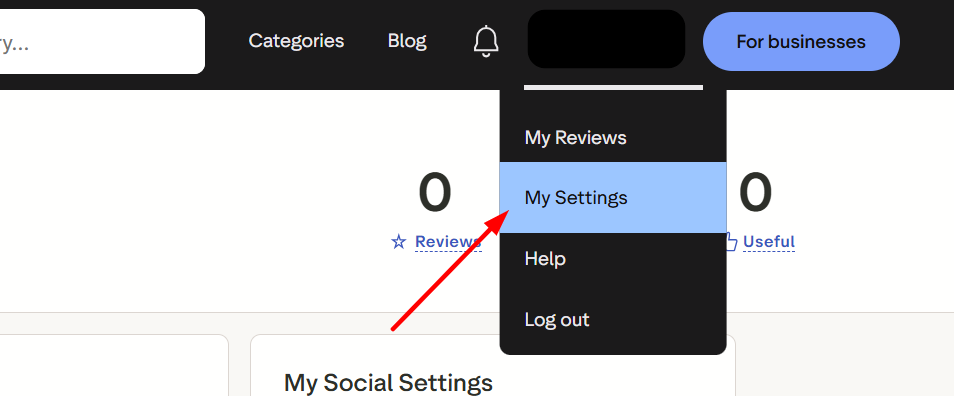
- First, log in to your account and click on the user icon in the top right corner of the screen.
- Then, select the “My Settings” option from the dropdown menu.
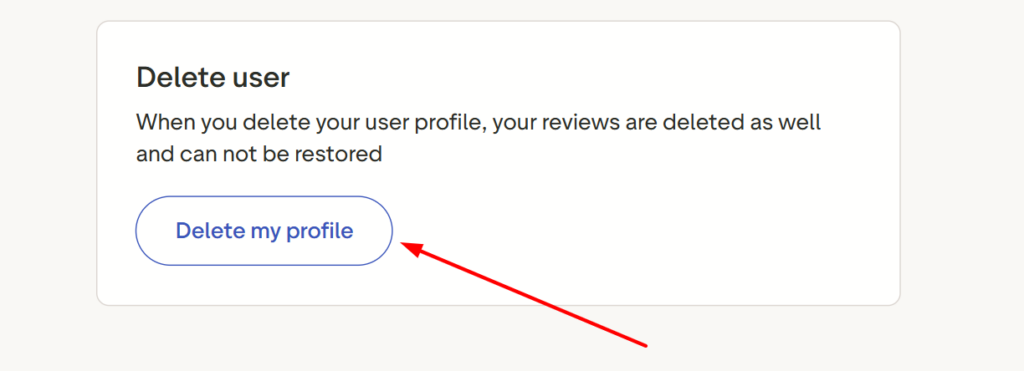
- Next, find the “Delete user” section and click on “Delete my profile”.
- After that, in the dialog box that appears, enter the email address associated with your account.
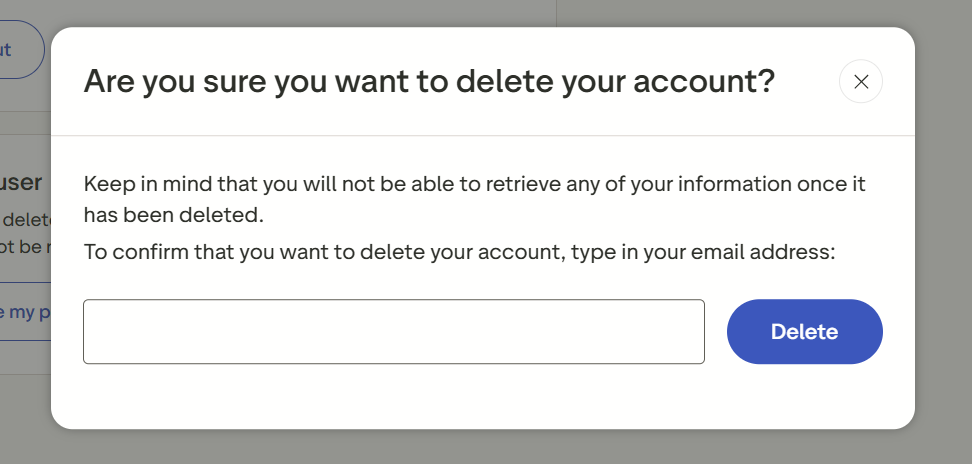
Finally, click “Delete” to confirm the permanent removal of your consumer profile.
Trustpilot Business: How do its account types work?
This is likely the section you were looking for when entering this article, as many users request the deletion of their Trustpilot account.
Here, it’s important to make a key distinction between a business account and a business profile, as they are two completely different things.
Differences between Trustpilot Business account and Trustpilot Profile
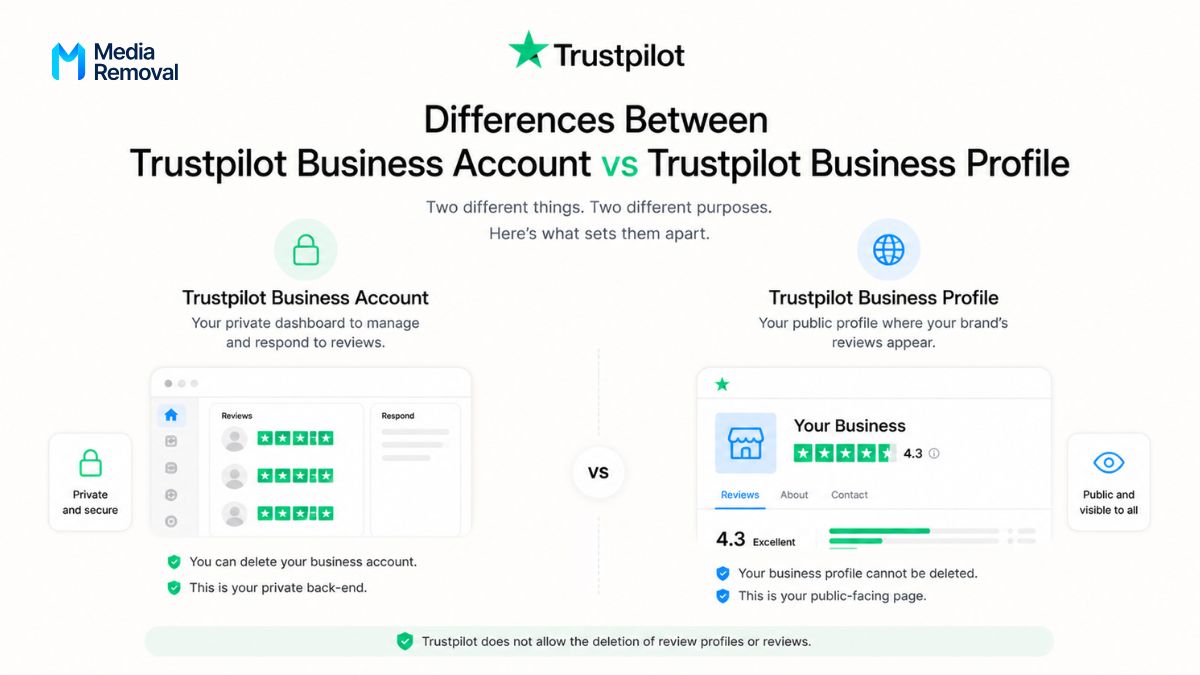
There are significant differences between a Trustpilot business account and a Trustpilot profile:
- Business account: this is your Trustpilot Business account, which you can delete. However, this does not apply to your business profile and its reviews. It functions as the dashboard where you manage and respond to reviews.
- Trustpilot business profile: this is the public page where your brand’s reviews appear, and it cannot be deleted under any circumstances.
While the business account acts as your private back-end for managing reviews, the business profile is the public-facing page visible to all users.
Trustpilot does not allow the deletion of review profiles because it considers them public and truthful information meant to protect consumers.
How to delete your Trustpilot Business account
Let’s look at how to delete your business account, keeping in mind that your public profile will remain visible since it cannot be removed:
- First, log in to your Trustpilot Business account and go to “Settings > Personal settings > My details”.
- Then, scroll to the bottom of the page and click “Delete my account”.
- Next, carefully review the “Your account will be affected” section, where the platform explains what will happen after deletion.
- After that, check the “Shared company profiles” list to understand how shared profiles linked to your account will be impacted.
- Once confirmed, click “Delete my account” again.
Finally, enter your password in the dialog box and click “Continue” to complete the process.
What you can do if you cannot delete your Trustpilot review profile
Being unable to close your review profile on Trustpilot is a real issue for many businesses, especially those receiving defamatory, false, or malicious reviews without justification.
In these cases, the fastest route is to report reviews that violate Trustpilot’s policies, as the platform provides specific mechanisms for doing so.
For your report to succeed, you must carefully document each case and prove that the reviewers are not real customers of your business.
Even so, if the team does not remove the reviews, you still have several options:
- Report reviews: if a review violates guidelines, you can report it individually, although this won’t delete your entire profile.
- Do not delete your business account: closing your Trustpilot Business account will not remove your public profile, so doing so is often a poor decision. Keeping it active allows you to manage negative feedback, respond to comments, and work on your reputation.
- Manage feedback: you can address negative reviews from users who had a bad experience and, once resolved, ask them to update their rating to improve your overall score.
What to do in a Reputation Crisis caused by negative Trustpilot reviews
There are situations where the volume of negative reviews is so high that managing them one by one becomes unfeasible or practically impossible.
When this happens, it may indicate a reputation attack on your Trustpilot profile. As discussed, handling a negative review crisis on this platform is more complex than on other review sites.
In this scenario, you should apply advanced review management strategies or consider hiring professional services to improve your reputation on Trustpilot.
Frequently Asked Questions About Deleting Trustpilot Accounts
Here are some of the most common questions users have about deleting accounts on Trustpilot:
How to Regain Control of Your Reputation on Trustpilot
As you’ve seen, managing reviews and the different types of accounts on Trustpilot can become a headache, especially if you’re dealing with negative reviews that you cannot resolve.
The main drawback of Trustpilot is that its profiles are public and cannot be deleted, making it a “sensitive” or difficult platform for many brands to manage.
As a result, it often becomes a serious issue for businesses with exposed profiles on the platform.
If this is your situation and you need to remove or manage your Trustpilot presence, Media Removal can help you handle any negative scenario you’re facing.
Our team, specialized in online reputation management, can help you manage and remove Trustpilot reviews, as well as significantly improve your overall rating.
You can request a quote to understand the scope of our services and start regaining control of your reputation as soon as possible. Tell us about your case, and we’ll design a plan tailored to your needs.

Take control of your online reputation
We can review your case and offer a personalized solution to help you take back control of what’s being said about you or your business online.